Sunday, April 26, 2026

Logscale, dashboards, and DNS

Futurama gif with Fry screaming 'Fix It! Fix it! Fix it!' to Leela

Losgcale, or as it rather be called Crowdstrike Falcon Logscale (say that 3 times fast and Bettlejuice may show up), is a Security Information and Event Management(SIEM) made by Crowdstrike. In other words, it is a glorified log collector that allows you to ask questions, create alerts based on those questions, and present the answers in pretty dashboards and graphs. It is not the only game in town -- there are quite a few open source and commercial ones -- but it is the one we will be talking about today.

Dashboards, dashboards everywhere

A dashboard is way to show what the logs know in a pretty graphical way: most people just want to see what they need to care about the logs; they should not be forced to learn how to do that manually.

For instance, what if you want to show all the times the logs reported a specific event happened? Which event? I don't know. Maybe a failed sshsession. Since we will be using fake data, how about if we want to know if the logs detected the presence of The Dude? Maybe that would look like this in the logs:

<47>Apr 24 08:06:46 192.168.12.9 banana/error[285]: dude-abides=false
Note: This is being fed by my Python-based fake log generator script. So, it says whatever I want.

Now, let's create a quick dashboard since this article is not about how to create one. All we want it to do is to find The Dude and let us know when and where the presence of His Dudeness was detected. Where here would be the host name; it would be nice if we have the full name (balcony.example.org in this example), or FQDN. Technically logscale has a filed called host that should provide us that. Problem is that it gives us whatever the log had: if that was a hostname, we are good. But, what the host does not have the full name, instead just the balcony or IP (192.168.12.9) address? Losgcale provide the query command reverseDNS(), which can return the FQDN:

| reverseDNS(host, as="host_name")

With that, we could create a dashboard whose query looks like this:

tail(100)
| reverseDNS(host, as="host_name")
| has_dude := if(text:contains(string=msg, substring="dude-abides"), then="Yes", else="No")
| table([@timestamp, host_name, type, has_dude, msg])

Just before anyone asks, this is a very simple query because writing dashboards is not the topic of this article. All I want it to do is to get logs like this (one of them has a message body I saved from a real alert down to the IP address)

<63>Apr 24 08:06:41 192.16.94.101 tiktok/error[1197]: Did you see that?
<47>Apr 24 08:06:46 192.168.12.9 banana/error[285]: dude-abides=false
<66>Apr 24 08:06:47 192.168.55.85 tiktok/error[867]: right_droid=false
<1>Apr 24 08:06:48 192.16.55.6 unamed[1155]: Did you see that?
<8>Apr 24 08:06:50 192.168.12.137 rm/error[1733]: Cannot destroy all humans
<20>Apr 24 08:06:51 192.16.55.6 tiktok/error[121]: %RCMD-4-RSHPORTATTEMPT: Attempted to connect to RSHELL from 217.69.139.202
<45>Apr 24 08:06:52 192.168.55.85 tiktok[426]: right_droid=false

which have IP addresses for hostnames (note the IP range; it will be important later). The "job" of the query is to identify those logs containing dude-abides. To make it look pretty, we are using the function reverseDNS() to convert the IPs to FQDNs.

The output should look like a table with 4 columns (you can stretch the window to try to make table look pretty):

@timestamp host_name has_dude msg
2026-04-24 04:06:41.000 balcony.example.org No Did you see that?
2026-04-24 08:06:46.000 balcony.example.org Yes dude-abides=false
2026-04-24 04:06:47.000 saladbar.example.org No right-droid=false
2026-04-24 04:06:48.000 kitchen.example.org No Did you see that?
2026-04-24 04:06:50.000 bathroom.example.org No Cannot destroy all humans
2026-04-24 04:06:51.000 kitchen.example.org No %RCMD-4-RSHPORTATTEMPT: Attempted to connect to RSHELL from 217.69.139.202
2026-04-24 04:06:52.000 saladbar.example.org No right-droid=false
Note: The reason we have 000 in the end of the time (ex: 08:06:46.000) is that logscale can handle/expects/would like that to be in microseconds. When it does not get them, it makes microseconds = 000.

It is broken!

When we run it the dashboard, something goes wrong: where is the host_name?

Screen capture of the logscale dashboard we created (looks like the table above). The host_name column is missing

Here's a representation of the above in glorious ASCII):

@timestamp has_dude msg
2026-04-24 04:06:41.000 No Did you see that?
2026-04-24 08:06:46.000 Yes dude-abides=false
2026-04-24 04:06:47.000 No right-droid=false
2026-04-24 04:06:48.000 No Did you see that?
2026-04-24 04:06:50.000 No Cannot destroy all humans
2026-04-24 04:06:51.000 No %RCMD-4-RSHPORTATTEMPT: Attempted to connect to RSHELL from 217.69.139.202
2026-04-24 04:06:52.000 No right-droid=false

So, how to make it work? By default logscale uses the dns servers known by the host it is running on. In Linux they could be defined in resolv.conf (I am going to use dns1, dns2, and so on to define the dns servers instead of using IPs so it is easy to see them; this is getting long):

[banana@logscale-box ~]$ cat /etc/resolv.conf
# Generated by NetworkManager
search example.org
nameserver dns1
nameserver dns2
[banana@logscale-box ~]$

dns1 and dns2, being our internal dns servers, do know all of our hosts in the 192.168.xx.xx (technically I should represent that as 192.168.0.0/16) range, which is a private IP range

Note: Private IP Addresses are those defined by RFC 1918 to belong to one of the following ranges: 192.168.x.x, 10.x.x.x, and 172.16.x.x

It turns out by default (again that word) logscale will not convert IPs in the private IP address ranges, you have to force it to do so. And that is done using 3 environmental variables (I call them constants. but what do I know?) defined in /etc/logscale/humio.conf: RDNS_DEFAULT_SERVER, IP_FILTER_RDNS_SERVER, and IP_FILTER_RDNS:

RDNS_DEFAULT_SERVER
  • Defines the server used when no server is explicitly specified in the function call
  • Ex: RDNS_DEFAULT_SERVER=192.168.5.3
IP_FILTER_RDNS
  • For reverse DNS lookups in reserved IP addresses
  • Which IP addresses can be queried with rdns() and reverseDns()
  • Ex: IP_FILTER_RDNS=deny 10.0.5.0/24; allow all
    • Cannot query hosts in the 10.0.5.0/24 range
    • Can query reserved IP addresses that are in other ranges.
IP_FILTER_RDNS_SERVER
  • For RDNS server filtering
  • Only restricts which servers can be explicitly specified in rdns() or reverseDns() function calls
  • If RDNS_DEFAULT_SERVER is defined, include it
  • Ex: IP_FILTER_RDNS_SERVER=allow 192.168.7.1; deny all
    • Allows 192.168.7.1 (and 192.168.5.3) as rdns servers for reserved IP addresses

Since dns1 and dns2 can resolve the problem, all we would need to do is to add the following lines to /etc/logscale/humio.conf:

IP_FILTER_RDNS_SERVER=allow all
IP_FILTER_RDNS=allow all

The following screen capture does show hostnames under host_name; I just deleted them because I used real names. I will manually alter the file(!) to put mine later.

Screen capture of the logscale dashboard we created (looks like the table above). The host_name column is now visible

Variations on the theme

  1. What if I just want to only allow the use of dns2 for reverse dns?

    Edit IP_FILTER_RDNS_SERVER

    IP_FILTER_RDNS_SERVER=allow dns2; deny all
    then, optionally, edit the dashboard query
    | reverseDNS(host, as="host_name", server="dns2")
  2. What if I want to only use a dns3 for reverse dns, but not define it in resolv.conf?

    Edit humio.conf

    RDNS_DEFAULT_SERVER=dns3
    IP_FILTER_RDNS=allow all
    IP_FILTER_RDNS_SERVER=allow dns3; deny all
    then, optionally, edit the dashboard query
    | reverseDNS(host, as="host_name", server="dns3")

More Complex Examples

What if I want to add google's dns server to resolv.conf as failover in case my DNS servers are both down?

[banana@logscale-box ~]$ cat /etc/resolv.conf
# Generated by NetworkManager
search example.org
nameserver dns1
nameserver dns2
nameserver 8.8.8.8
[banana@logscale-box ~]$

It depeneds on the other settings:

  1. If you do not add the IP_FILTER_RDNS*humio.conf? Logscale will be in default mode and never try to resolve private IP addresses. And that is what started the events that lead to this article.
  2. If you set humio.conf as in the original example,
    IP_FILTER_RDNS=allow all
    IP_FILTER_RDNS_SERVER=allow all
    
    and do not specify a dns server in the dashboard query as in the original case
    | reverseDNS(host, as="host_name")
    Logscale may try to that for the private IPs, which will not work but now oyu are telling google, and possibly others who are listening, which private IPs you use. Don't do this!
  3. If you set humio.conf as in the original example,
    IP_FILTER_RDNS=allow all
    IP_FILTER_RDNS_SERVER=allow all
    
    and specify a dns server in the dashboard query
    | reverseDNS(host, as="host_name", server="dns2")
    Logscale will gracefully not show host_names when dns2 is down, and will not query google's.
  4. If you set humio.conf specifically telling which dns servers to use. This is better than the previous solution
    IP_FILTER_RDNS=allow all
    IP_FILTER_RDNS_SERVER=allow dns1; allow dns2; deny all
    
    and do not specify a dns server in the dashboard query as in the original case
    | reverseDNS(host, as="host_name")
    Logscale will only show host_names when either dns1 or dns2 is up, and will never try to query google's. This is the best because you are limiting which dns servers to use in one single location (humio.conf) instead of possibly filtering every single dahsboard. If you need to have dashboards quering specific dns servers, add them to the humio.conf file as above and then use the specific one where needed. This add a second layer of protection.

Saturday, June 15, 2024

New Windows WiFi RCE vulnerability

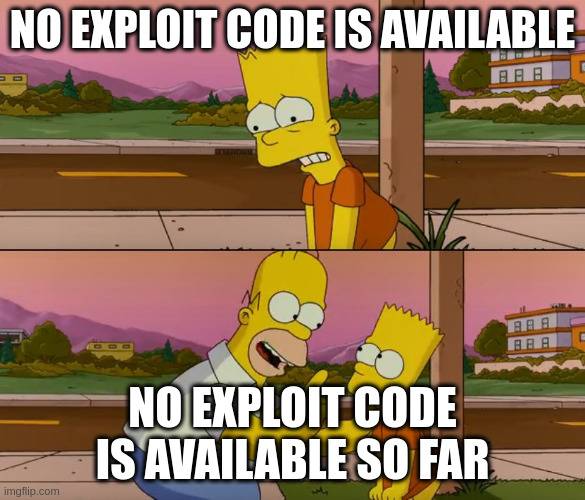
Full Disclosure: I am just posthing this because of the meme. It sure beats the usual "hacker (because wearing hoodie) in a dark room with computers" picture that is so common in these posts. Yes, I am looking at you Tom's Hardware.

A "Remote Command Execution" (RCE) vulnerability just means that someone can send remote commands to something whose software have this vulnerability. A classic case of a RCE Vulnerability that was exploited is the log4j one (hello 2021!). These commands can be something like uploading malicious code to the computer or application which can be unleashed in the computer running this application. On June 12th, Microsoft's Patch Tuesday to address 49 CVE-tagged security flaws. Amongst them there was a patch for CVE-2024-30078, which deals with the WiFi RCE Vulnerability that is the topic of this post.

The main difference here is that this vulnerability is on the (Windows) drivers for a network card. The beauty about such attack is the attacker does not need the help from the user (as in phishing) to get the malware into the computer. In fact, chances are unless the code is patched, there may not be much stopping such an attack; all they need it to send a malicious networking packet to enable the remote code execution, which would then be followed with them uploading their own code to start exploring their new acquisition.

To add insult to injury, the attackers may not even need to be in the same network; all they have to be is within the range of the vulnerable computer. Witht he right equipment, "within range" can be measured in feet or even miles.

Homer Simpson: No exploit code is available so far

Microsoft, who issued a patch for that, stated that there are no reported malware exploiting this vulnerability and that "Exploitation Less Likely" while the Cyber Security Agency of Singapore thinks it is a high-severity vulnerability and everyone using the Windows versions affected by this (pretty much everything remotely recent) should "update to the latest versions immediately". I do not know about you, but I would side with the Singapore agency on this one.

TL;DR:

Have Windows computer? Patch it. Immediately

Thursday, May 23, 2024

Browsers, expired certs, bad defaults, and risk ASSessment

I have had to access more device/websites with expired or self-signed certs than I would like to admit. There are also those which are just plain insecure (think passwords being sent unencrypted). If you never experienced that, either you are really lucky or, well, welcome to The Planet Earth!

There are those, some of them are my friends, who think that is not acceptable and the only solution is to replace all this junk with new junk which complies with current regulations. Some of them even have CISSP and CISM certificates and have titles like "Senior Security Engineer". They all live in another world with no relationship to ours and our reality.

There, I said it. Call me heretic, but do not be disappointed if you will need to pick a number; you will not be the first or the last. But, I will not change my mind.

Secure All the Things

One of those security concepts that those who are CISSP/CISM/etc certified should know by the very reason they are certified is risk. Everything has a vulnerability, a weakness that if exploited (intentionally or accientally) may, well, hurt. If you ever got electrocuted while working on house wires or trying to repair an appliance you know what I mean. Also, boiling oil in a pan can hurt. So you deal with it. For instance, you can just buy a new electric tea kettle instead of trying to replace the old wire. Or, if you are in a business setting, you can decree all computers will have the latest operating system with the latest patches even if that mean replacing the computers

And that is where we disagree

You see, sometimes that is not feasible. Perhaps I have the skills to replace a wire and doing so is much cheaper than getting a new kettle. Or, you have an old UNIX computer connected to a multimillion dollar test device whose software is hardcoded to that specific version of UNIX; replacing it would cost 50 million and you would be throwing away a perfectly good testing system. Or, that medical device only sends data through wireless to a ftp server, so its password is shown for all to see; each of these devices goes for $15,000 on a good day and really there are no better in its class for the service it provides. What to do?

You analysize the risk and make the best choice of how to deal with it. The options are not only "do nothing" (accept the risk) or "replace it" the "Secure All Things" crowd advocates. There are more alternatives (I am using CISSP parlance here):

  • Acceptance. Decide it does not worth trying to do something about it and move on.
  • Mitigation. Come up with something to eliminate the threat, like keeping all the computers running the latest versions of their software. This is where the "Secure All Things" crowd gathers.
  • Deterrence. Can we cut down the risk? In the case of the multimillion testing device, what if we take it off the network and use an external drive to transfer test data between it and a more modern computer we can secure? Or for a network appliance that can only be accessed by a web interface which has a self-signed certificate that may have already expired: if you cannot replace the certificate (licensing cost or just plain bad coding), put these appliances in a secure network with restricted access, and with a specific web browser configure to accept connecting to that appliance using that cert (and perhaps old encryptions).
  • Avoidance. Stop doing something that causes risk. If printers can be hacked, eliminating all printers takes care of this. If people can attack your wireless, remote the wireless.
  • Transference. Make it someone else's problem. Buy cybersecurity insurance. This can get expensive quickly and insurance companies have been raising the requirements. For instance, most of them will have a clause that if they found out you were careless, no money for you.
  • Rejection. The stick-your-head-on-the-ground approach to danger. Pretend it does not exist. I know it is a very common reaction, but try not to do it; this is considered lack of due care.

So, which one should you do? It depends, and we are way ahead of ourselves. We should start finding out what we have, knowing that getting a true full inventory may not be (economically) possible? But, let's say we did find out what we have. These are our assets, and we need to assign values to them, as risk can be seen as a number (usually money): we have to compare how much each risk response (that includes the bottom one, not doing anything) cost and figure out the cheapest one. You see, business exist to make money, and how we manage risk is a cost to the business. If the cost to mitigate the risk is close to that of deter it, maybe mitigation is the best solution. This kind of thought process is expected from someone who is called "senior security engineer/architect." I myself am fine with knowing that most solutions to minimize risk end up being finding a deterrence. And sometimes, you just have to accept the risk and move on. After all, companies (and individuals) have only so much money to deal with risk; a good senior level security professional will make each dollar count.

You are still on the soapbox

Right you are. We still have not detected the vulnerabilities. And the little dirty secret is that the findings generated by the security scanners should not be taken as face value. Some of these scanners are just mindless pattern-matching scripts. A novice security professional will just the tool and sound the alarm. A senior security professional will compare the findings with the information she has about the IT infrastructure (which may have required her sitting with the IT team) and eliminate what does not make sense for her setup and then prioritize it. Even if she uses AI (there, I said it), she will never blindly follow whatever the tool says.

Don't be what I call Qualysguy, that guy who runs Qualys and then sends a ticket to the IT team saying "fix all these things"

Tuesday, April 30, 2024

Logscale's free tier is dead, Jim

Some of you have deployed logscale at home or in a small setting as a way to get some experience with it. That was possible because Crowdstrike provided a free tier on the same lines as Splunk, Burpsuite, and even AWS/Azure/Google: some features were disabled and the amount of data was limited, but you were still able to get your feet wet in it. Now that is benefitial to both the company and you:

  • You learn how to use a well-known commercial product so when you go apply for a job that uses it knowing enough so you can start using it. Now some will claim the only experience that counts is experience you got from a paid job. Given how active I am in the open source community, I disagree. In fact, I will put my neck on the block and say there were many things I learned in a home lab I could not learn at work because, well, even when you work in a research institution what you can work on their time is dictated by what they think is important.
  • That does not mean if you install it in your homelab you will be just fiddling with some controls without really understanding the product. Logscale, AWS, Splunk, and Portswiggler (just using the same companies I mentioned because I can't be bothered finding links to others) offer free formal classes with hands-on exercises (and, yes, I know some of the AWS and Splunk videos are cringe but at least they are trying). These classed can lead yo you getting certfied, but that will cost and is a discussion for another post. Which leads to...
  • Microsoft, Splunk, and all of those companies want you to learn their product well. If you do, when you work at a company using it, you will not suck using it, so their product will not suck. And, if you get to the point you are the one recommeding products, guess which ones will you select?

So, what about this Logscale gripe you have?

Like the other vendors mentioned above, in early 2021 Crowdstrike acquired Humio, which later became Logscale. Later in that year, they announced the Humio Community Edition, the free version of Logscale with similar restrictions as, say, Splunk's (stealing the above from their announcement):

  • Ingest up to 16GB per day
  • 7-day retention
  • No credit card required
  • Ongoing access with no trial period
  • Index-free logging, real-time alerts and live dashboards
  • Access Humio’s marketplace and packages, including guides to build new packages
Screen capture of message acknowledging the signing up for Logscale Community Edition
Great! So now you can pick and choose between the two! Not quite. Fast forward to March 2024, when CrowdStrike stopped accepting applications for LogScale Community Edition (link accessible only if you have a customer account unfortunately). Also, while those of you who still have your community account will still access it, if you do not access the Community Account for more than 90 days, it will be removed. Do you want to try before you buy? Sign up for their 15-day trial version after providing enough info about your and your company. Oh, they too have a Crowstrike University, but to get in you need to be a current paying customer; not even Bezos does that.

Bottom line

  • If you want to learn Logscale, and by that I mean also practcing it, you will have to get hired by a company that already has it.
  • If you are considering using it but have never used similar products, you will have to spend money. So, you might as well hire someone to see if it is the best solution for your needs. Case in point, a lot of people, me included, make fun of Splunk's price. Thing is, someone who is a Splunk Engineer, as opposite to a Security Engineer with Splunk Experience, knows how to put it together so its yearly cost does not go up the roof.

Tuesday, December 19, 2023

T-Mobile, Firefox, and Incognito mode

Most browsers have what they call a privacy or incognito mode. The idea is that it deletes any cookies and cache created by a website you ventured into once you close the browser (important step here). Note it does not replace a VPN or anonymize your traffic in any way; there are other tools for that. Still, I not only like that but I set my browsers to always start in that mode (we can talk about how to do so in a future post). Cookies is one of the ways websites use to track you (as in what GDPR would consider to be personal data), your habits, so they can know more about you than you do. I would rather not they do that. Also, shadier individuals -- even shadier than certain commercial organizations that I rather not mention -- also like them when they gain access (think phishing attacks) to your system as these files may have fun stuff like session cookies and even passwords they can steal.

Understandly, some companies do not like when I get rid of their cookies, but it is hard for them to do a thing because this is done at the user's end. However, it seems T-Mobile found a way around that: they chose to detect and block the user of Firefox running in Incognito Mode in their website:

T-Mobile message stating they do not support Firefox in incognito mode

Even though I provided the link to the official page, here is the text for those who are using a text based browser or cannot see images:

Firefox is no longer supported in private mode The Firefox browser is no longer supported in private mode on our site. To continue, please take Firefox out of private mode or choose another browser. We recommend Chrome, Safari or Edge.

Why are they singling out Firefox and derivatives (I also tried LibreWolf before writing this article)?

  • Could it be they assume everyone either uses a Windows, a Mac computer, or at least a Google-derives ystem (think Chromebook and Android), and any user running neither (I use Linux) is to be treated with mistrust?
  • Could it be that Safari stopped supporting extensions such as UBlock Origin, and Edge, well, is Edge just like the normal (as in not ungoogled) version of Chrome talks too much back to the mothership? After all, these browsers do have their versions of privacy modes, so that can't be the main issue. Nor that most sites, banks included, seem to work just fine with Firefox incognito mode.

Contacting T-Mobile led to nothing, so all I have are the speculations I made here. You too can make your own!

Saturday, December 2, 2023

Websites whose login pages do not work correctly

It is late a night and I just had a thought I want to share: have you ever went to a website, say, your abnk, where when you try to login -- pasting the username and password so there is no possibility of a typo -- it does not work and sends you to a "login failed, try again" page, it then works there?

I do not know about you, but if I were going to try to steal credentials, creating a website that sits in front of the real one (think man in the middle attack) would come into mind.

That is all I have for now: just food for though.

Saturday, November 18, 2023

Online subscriptions: Giveth and Taketh Away

Like many, I too have a gmail account. And I have used it to buy magazines, tv shows, and even subscriptions. My reason is the same as everyone else: it is convenient. Recently I received an email stating

Here is the text version, so people can translate to their language or jut be able to read it without having to rely on the image:

Since 2020, new purchases of magazines have not been available in Google News and very few users now regularly access their magazine subscriptions. We wanted to inform you that support for magazine content in Google News is being discontinued beginning on December 18, 2023, which means access from Google News apps or news.google.com to the library of magazines you previously purchased or subscribed to will be removed. To continue to access previously purchased magazine content, you must export and save each purchased issue before December 18, 2023.

Claiming this to be a security or even privacy topic may sound like a bit of a stretch, but hear me out. When you buy a TV show, movie, or even magazine subscription through Google, Apple, Amazon, Barnes & Noble, or whoever, unless you can download that to your computer and view it without needing to use their website or app, you may lose access to them for different reasons:

Technical issues.

People have reported ebooks purchases they made and downloaded to their book reader -- usually a phone app or Kindle -- one day are no longer in their devices. Or said books are no longer even listed in their accounts. Or, even when said books are in their devices, pages are/became missing. Contacting the publisher (or should we call them streaming providers as they may only be licensing the sale/distribution of the product?) can lead to hours if not months of frustration; they may be equally baffled for the reason of these problems.

This also frustrates authors, whose present and future earnings is directly related to the popularity of their work: imagine if one of your books was #1 bestseller and then because of a computer glitch with the streaming provider it cannot be easily found, downgrading it to #150. This have happened already.

The Wikipedia Effect

Wikipedia is a living document: people are always editing and improving on its contents. So, what you have read last month may have been disputed and edited out of it. That leads to arguments that it should not be quoted as reference source. Some authors and producers may feel the initial version of their book or movie did not portray the story the way they intended and would love to be able to come back, months or years after publication, and change it. George Lucas is the posterchild of this.

With streaming that no longer means a new release: all the old versions can be now updated just like a computer program. I myself have seen shows whose opening credits for specific episodes have changed at least 3 times; the latest of which added hints to events in the episode which really do not add value to it. Bottom line is what you bought last year may no longer be what you have. Is this good or bad? That is up to you. In my opinion while there is a benefit for textbooks and study guides, when we are talking about a work of fiction or even a technical paper, that removes the power from you the buyer to decide which version you have. I am glad I am still able to see the original Star Wars trilogy without the cgi "enhancements" added later.

Licensing issues

Let me cut to the chase: you do not own what you paid for. According to the Amazon's Conditions of Use (not singling them out but it was the one I could easily found),

COPYRIGHT
All content included in or made available through any Amazon Service, such as text, graphics, logos, button icons, images, audio clips, digital downloads, data compilations, and software is the property of Amazon or its content suppliers and protected by United States and international copyright laws. The compilation of all content included in or made available through any Amazon Service is the exclusive property of Amazon and protected by U.S. and international copyright laws.

The part I highlighted (boldfaced?) is the one we want to look at. All those Kindle books and movies and music you bought at Amazon Prime belong to Amazon or whoever they licensed it from. You only paid a license to access them, and contrary to social media sites and even companies you work at this license is not perpetual. There has been cases where, for instance, Kindle owners found books they purchased were removed from their accounts. And it does not end there: the Amazon Services Terms of Use states that this license can be revoked. While its words claims that termination only happens if they decide your are not in strict compliance with the agreement, they do reserve the right to decide if that is the case.

How does that affect privacy?

Some books or movies were removed from streaming sites because they were considered inappropriate; that in itself can mean many things including not politically acceptable. Your purchase/subscription records are in possession of these streaming providers. Depending on the location of residence, what can possibly be personal information -- they can be used to infer religious beliefs, sexual orientation, and so on -- is sold to other merchants, which will certainly use this data to create a profile on you (called an avatar) to better market to you be it by ads on free phone apps or even plain old emails. Others such as government and more criminal-minded organizations can also acquire the data for their own purposes.

How to minimize personal data exposure?

If you like a movie or a book, why not buy the movie on DVD/Blueray or the book either printed or at least as a PDF? At the very least now you own it in a way they cannot remove your access to it. You can find privacy-respecting DPF readers for most phones and computers. You can still convert the movie available in some electronic form so you can watch it without worrying about damaging the disk. There may be legality issues which are beyond this post but the technology is there. As a bonus, you do not have to worry about the content of your purchase changing from the version you paid for.

Friday, October 20, 2023

Helping attackers collect your personal information: spearphishing and imgur

Since this is the cybersecurity month, let's talk about one of the sure ways to help malicious people attack you or steal your identity. Of course we are talking about companies which nudge people to place their personal information in public. In today's example, we will focus on imgur. It is not that bad of a website if you take the usual precautions with your images and what you post on it. Worried the bad guys will need to put some effort, its creators offer a "Cake Day":

For those who are not able to see the image (do not consider yourselves unlucky), here is the exceprt from that email I would like you to focus on (boldface is mine):

It is customary to celebrate your Cake Day (that's your account’s creation day) by sharing something excellent with the Imgur community. Perhaps a favorite GIF, a great personal story, a meme, or some interesting information would do? Head on over to Imgur to create a new post.

"What is so bad about that?" you may ask if you skipped the first paragraph in this post. Well, let's start with a phishing attack: while most of them are half-hearted attempts to con users with badly written emails laden with links to unscroupulous websites or malware-filled attachments, the better ones are more carefully crafted and aimed at specific people. For these to work, they need to have as much information on their targets. So, knowing the personal stories and interesting information requested by imgur help with this information gathering step.

Note that this is technically not a GDPR violation as it seems (I am not going to ask the person to click on the imgur tracking link just to get more info for this blog entry) that it requires you to go through the effort to enter it and it does not require you to enter it to continue. In a future post we will show examples where that is not the case.

Wednesday, August 2, 2023

Burger King, Data Breach, French Style

As some of you may be aware of, Burger King experienced another data breach , and it is slightly different from the 2019 event. As before, personal data was exposed due to misconfiguration of their website: specifically in the Jun 2023 incident the passwords for databases and other services were stored in a publicly accessible text file. This would not be that interesting if the incident took place in their US location, where personal data of children was also exposed (Like Panera, which uses palm scanning, Burger King nudged children to enter their info so it was more convenient to order their favourite items and parents to pay without needing to have to go to the cashier), having its customers mysteriously receive emails with blank receipts, or that one of these services whose authentication info was stored in that configuration file was also our old friend Google Analytics would be forgotten in a few weeks.

What makes the special sauce special is this is happened in France, which means it is under the jurisdiction of the GDPR. Data breach investigations under those regulations are rather different than those under US laws. If the American-based multinational cannot prove it has done due diligence regarding how it protects the personal data of its customers and current/future employees, they should at least expect heavy fines: according to GDPR Art. 83(5), severe violations can cost up to 4% of Burger Kings total global revenue, which in 2021 was US$ 1.81 billion. Given the authentication was stored in plain text and children data (which may have been collected in violation of GDPR Art 8, and falls under Recital 38) is at risk, the fast food giant should not expect the French Data Privacy Authority (Commission Nationale de l'Informatique et des Libertés, or CNIL) to be as lenient towards American companies as the Irish one.

This is a very new case -- announced today in the news -- and we have no idea when Burger King reported to the CNIL (per GDPR Art. 33 they must report within 72h of learning of the incident), so we will have to wait to see how it will develop; expect the case to take at least months before the CNIL deliberates and issues fines.

Sunday, July 30, 2023

Bloatware/Spyware: TikTok & Meta preinstalled in Windows 11 devices

Have you heard of the term "promoted apps?" That is the euphemistic term for programs that were preinstalled in a new computer. People like me knew them by a different term, bloatware, they were popular in the old Microsoft Windows and MacOS installs; the idea was companies would give money to OS and/or computer/smart phone manufacturers to bundle the former software with the later's products. Think of it as a variation of paid advertising or infomercial. This junk was grouped into:

  • Trialware
  • Adware
  • Spyware, like those bundled by cell phone carriers.
  • And, on a rare occasion, something useful. Somewhere out there there is an example.

That trend has not diminished. If you check your brower, you may find it is ready to connect to offer a youtube search engine built-in. People have been reported Windows 11 coming with TikTok and Meta installed at least since 2022. No matter what people said, I do not mind TikTok/Meta/Twitter/youtube as long as I decide to install it. I mean, what is wrong with going to an app store and getting it? But, why should any of them be bundled into a new Windows 11 tablet? Yes, there are tricks and instructions online to remove them, but they should not be there to begin with.

Friday, June 9, 2023

Protest against Reddit API Changes and killing 3rd party APIs: Jun 12-14. Call today at 10:30AM PST

This may sound like a politicized post, but there is madness behind reason here: for a while there has been many third party applications used by Reddit users to post (include posting with a modicum of privacy (hey, we talk a lot about that here!) as sometimes said posts can be career-ending ones) and keep track of topics of interest. Even the moderators make use of such tools to keep spam down. All of these tools were possible using the API provided for free by Reddit. Many of these tools are open source, offered for free.

Fast forward to now, and Reddit is aiming for an IPO this year. Also, it has decided to start charging for the use of its API starting June 30. There are some who will claim the two events are related. This is expected to cause most of these 3rd party apps to be killed and force users to rely on the official app which is not know for its interface or features, besides its privacy issues.

As a result,

  • More than 3000 communities (subreddits) will go dark from Jun 12 to Jun 14 in protest to this decision, including many that are associated with IT in general and cybersecurity specifically. Some of them will shut down permanently.
  • There is a thread where you can get the most recently developments.
  • People are flocking to Reddit alternatives including Mastodon, beehaw, and Discord.

Reddit said its CEO will be hosting a "Ask Me Anything" (AMA) event today at 10:30AM PST to talk about their plans regarding the API.

Is there another reason?

Well, what if Reddit realized the people behind large language models -- OpenAI, Google, etc -- are making money by scraping their website to get data for their AI models (since it is still a hot topic, here is the obligatory mention of ChatPT), and now Reddit wants to get a piece of the action?

Monday, May 1, 2023

Cackalacky Con This Week!

First talk (after the announcement speak) at CackalakyCon 2023

Did you miss the last 3-day weekend? Well, I think we have here a reason for you to make it happen!

If you live or are near the NC Triangle (Raleigh, Durham, Chapel Hill) this week, on Friday May 5th the Cackalacky Con conference begins at the DoubleTree by Hilton Hotel Raleigh-Durham Airport at Research Triangle Park. It goes on until May 7th and will contain lots of events (besides the talks) such as CTF, hardware stuff, lockpicking, and much more.

Videos from previous conferences such as this one
can found at the CackalackyCon youtube chanel.

I should warn you that I will be giving a talk. So, if you happen to land on it, please act terrified.

Still, lookie at the fancy badge I got!

Speaker badge for CackalackyCon 2023

Sunday, April 16, 2023

Passwordless authentication and MFA

There is a push to stop using passwords to authenticate into systems. In 2020 Microsoft announced in its blog that it hopes to make its customers go passwordless in 2021. They plan on achieving it by using FIDO2 security keys such as Yubikey, (smart) phone-based sign-in tools such as the Microsoft and the Google Authenticators, and biometric tools such as fingeprint authentication. They are not alone; Apple and Google have also working on that not only to login to their devices but also websites and apps.

Here is the fun part: those solutions are being pushed as "you only need to pick one of them and you are secure!" Want to login to your phone? Just show your face! Get into your house? Stick your finger at it! How about your bank? Click on something in your phone! So, what it is doing is replacing one form of authentication -- passwords (boo! Hiss!) with a passwordless solution.

What is wrong with this picture?

Does anyone remember Multi Factor Authentication (MFA)? The idea is to use more than one form of authentication so if one is compromised your account is still not compromised. That was usually done by using one authentication from each of the following groups:

  • Something you know. Like a password.
  • Something you have. Like a badge or a Yubikey.
  • Something you are. Like your Iris.
The so-called passwordless solutions being mentioned started their lives as a second factor in the MFA design, but now they are being pushed as the only form of authentication required. That implies those companies do think they are very strong against attacks to be used on their own.

When the FBI and the CISA announced MFA can be hacked, they are really talking about the secondary, passwordless, authentication of the MFA process, password being the primary (which has its own issues, but we are talking here about increasing the odds that the multiple authentications will not all be compromised at the same time). is not a panacea. Like everything else, passwordless authentication can be hacked;see the Uber data breach.

Bottom line

Passwords can be compromised. Passwordless authentication can also be compromised. There is no panacea. Both together should be a bit more secure than each of them. If you are bound not to have passwords at all, get two distinct MFA systems.

As the old say goes, Two is One, One is None.

Friday, March 24, 2023

Github updating its ssh keys

Today I learned that the Microsoft-owned Github decided to update its RSA SSH host host key but did not explain its reasoning. Why would it go through all of this trouble? Usually when a company does that, it is their way to cover that they were hacked or were compromised in some other way. That is not what is written in their blog, so we will have to wait for this to unfold.

"What does that mean to companies and developers depending on that?" Well,

  • If you created a SSH RSA keypair to authenticate against github -- so you can git push and git pull your repos without entering your password -- you probably wants to consider creating a new pair, deleting the old one, and using the new one. Ideally, this may also be an excuse to switch to an ECDSA-derived key such as ed25519 if you are able to. Sometimes this is hard because you may be dealing with a host that does not support that... not that have ever happened to me.
  • If you have received the github RSA pub host key, which was added to your .ssh/known_hosts (if you are using Linux, OSX, and some UNIX variation) file, you will need to delete that entry and get github feed you a new one. Of course, you want to ensure you are getting the proper github key, not one from someone impersonating it.
  • If you use Windows, well, let me get back at you on that later.

Now some developers will argue that relying on known_hosts has caused more failures of working software than preventing faked host access since SSH was originally written. Their proposed way to deal with that is to tell ssh not to check the validity of the host key. In Linux, OSX, and other UNIX versions that would mean to disable that in ~/.ssh/config. If you want to disable the Key checking to all ssh connections, you could do something like (the boldface lines are the most important parameters)

    Host *
           UserKnownHostsFile /dev/null
           StrictHostKeyChecking no
           LogLevel error

While I understand that the above is a clever way of stopping suck pesky keys from hampering your style, disabling security for the sake of convenience is never a good solution. The more time-consuming solution is to remove the offending keys in ~/.ssh/known_hosts so you can ensure you are getting the right key, not a key impersonating the site you want to connect to, which in this case is github.

Fun fact: given that I saw the following message, I think they are not only changing the RSA key:
Warning: the ECDSA host key for 'github.com' differs 
from the key for the IP address '140.82.121.3'

Thursday, March 2, 2023

TDIL Slack uses let's encrypt

This morning I was going to login to slack from the command line and saw the following message:

┌───────────────────────┤SSL Certificate Verification├────────────────────────┐
│Accept certificate for slack.com?                                            │
│                                                                             │
│The certificate for slack.com could not be validated.                        │
│                                                                             │
│The certificate is not trusted because no certificate that can verify it is  │
│currently trusted.                                                           │
│                                                                             │
│                ┌────────┐ ┌────────┐ ┌──────────────────────┐               │
│                │ Accept │ │ Reject │ │ _View Certificate... │               │
│                └────────┘ └────────┘ └──────────────────────┘               │
└─────────────────────────────────────────────────────────────────────────────┘
Let's probulate a bit:
┌──────────────────────────┤Certificate Information├──────────────────────────┐
│Certificate Information                                                      │
│                                                                             │
│Common name: slack.com                                                       │
│                                                                             │
│Issued By: CN=R3,O=Let's Encrypt,C=US                                        │
│                                                                             │
│Fingerprint (SHA1): 76:bc:49:94:88:fa:90:d6:59:3c:04:0d:81:81:67:58:35:ce:a0 │
│:d5                                                                          │
│                                                                             │
│Activation date: Thu Mar  2 07:32:27 2023                                    │
│                                                                             │
│Expiration date: Wed May 31 07:32:26 2023                                    │
│                                                                             │
│SHA256: 25:6f:90:6b:16:b5:1b:4a:27:27:55:19:9d:1a:76:61:11:b0:d2:7c:6b:b6:b6 │
│:36:48:ac:c5:5a:6c:92:8f:80                                                  │
│                                                                             │
│                     ┌─────────────────────────┐ ┌───────┐                   │
│                     │ View Issuer Certificate │ │ Close │                   │
│                     └─────────────────────────┘ └───────┘                   │
└─────────────────────────────────────────────────────────────────────────────┘
So,
  • They are using Let's Encrypt
  • The certificate is renewed every month
  • The new certificate is not enabled yet (it is 7:20h right now)
What else can we find?
┌────┤Certificate Information├────┐icate Verification├────────────────────────┐
│                                 │                                           │
│Unable to find Issuer Certificate│                                           │
│              ┌────┐             │d not be validated.                        │
│              │ OK │             │                                           │
│              └────┘             │ause no certificate that can verify it is  │
└─────────────────────────────────┘                                           │
│                                                                             │
│                ┌────────┐ ┌────────┐ ┌──────────────────────┐               │
│                │ Accept │ │ Reject │ │ _View Certificate... │               │
│                └────────┘ └────────┘ └──────────────────────┘               │
└─────────────────────────────────────────────────────────────────────────────┘
Very interesting. How about from the command line?
user@desktop:~$ echo ''|openssl s_client -connect slack.com:443 | openssl \
x509 -noout -enddate -startdate
depth=2 C = US, O = Internet Security Research Group, CN = ISRG Root X1
verify return:1
depth=1 C = US, O = Let's Encrypt, CN = R3
verify return:1
depth=0 CN = slack.com
verify return:1
DONE
notAfter=May 31 07:32:26 2023 GMT
notBefore=Mar  2 07:32:27 2023 GMT
user@desktop:~$ 
Now you too know!

Wednesday, March 1, 2023

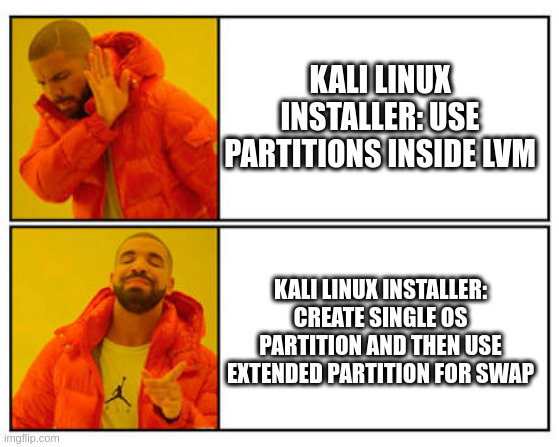
Splitting Kali VM's partitions, or why I do not like the default (Desktop) Linux partitioning scheme

WARNING:

  1. Just because I am mentioning Debian/Ubuntu Linux in my rant, it does not mean the RedHat-derived distros are guilty free. In fact, I am looking at you, Fedora. The reason I am mentioning the Debian-derived distros are because
    • Kali is built on Debian.
    • I usually run an ubuntu derivative desktop Linux in my laptop.
    The principle of my rant still remains, and is really not as security- or privacy-oriented as the other blog posts.

  2. This post will be a bit more technical than the usual, and will not take the time to explain certain things or this will become a book. There are other shows to watch.

Like many, I have Kali Linux installed in a virtual machine I use for things. Given the requirements in their install page, which said

On the higher end, if you opt to install the default Xfce4 desktop and the kali-linux-default metapackage, you should really aim for at least 2 GB of RAM and 20 GB of disk space.
I thought it was fine building a vm following those specs to run Kali. The memory I was not that concerned because adding more to a KVM vm guest is pretty easy (provided you have some to spare). But we are not talking about how to build a Kali vm guest; there are a lot of blogs and websites claiming to provide "everything you need to know about" how to do the deed, where the everything keyword means "we will rush through it but pretend we are experts." Am I being an arrogant bastard? Quite possibly, so let's jump to an example.

The problem

I am kinda of particular about the partition layout I use. In fact, let's take a quick look at my desktop (where I am typing this right now):

Device       Start       End   Sectors  Size Type
/dev/sda1     2048   2099199   2097152    1G Linux filesystem
/dev/sda2  2099200   3147775   1048576  512M EFI System
/dev/sda3  3147776 212862975 209715200  100G Linux LVM

Those whith sharp eye noticed I have made the partition for that FAT offspring, EFI, which is way larger than needed. Call me lazy. What you may not be aware is that this is a 1TB (in Subway sandwich math; it really is 931.53 (GiB) if we use powers of 2 just like C'Thulu intended us to do) drive. In other words, I did not create a partition that ranges the entire disk as I found to be the default in most Linux installations, specially desktops. You know, because everyone installs the OS such that to use the entire drive. Who would do anything else?

Next you will notice there are 3 partitions:

  • /dev/sda1, which is the /boot
  • /dev/sda2, which is the already-mentioned EFI
  • /dev/sda3, which is a LVM physical volume for everything else.
I like this format since it works for both MBR and GPT styles of partition tables: I can have 3 "primary" partitions in the older MBR style without breaking a sweat. Consistency is good. Now we can talk about the partition for everything else: since it is a lvm physical volume, I then split it up into separate partitions and assign them to some directories, namely (vg name changed to protect the innocent. However, I chose not to sanitize the name of the swap partition before posting it here)

LV       VG     Attr       LSize  Pool Origin Data%  Meta%  Move Log Cpy%Sync Convert
home     desktop -wi-ao---- 30.00g                                                    
root     desktop -wi-ao----  4.00g                                                    
swaphole desktop -wi-ao---- 10.00g                                                    
usr      desktop -wi-ao---- 11.00g                                                    
var      desktop -wi-ao----  6.00g

At this point in time someone on the back of the room will shout "Heresy! Separating partitions in their own filesystems is an outdated concept! You should use a single partition! On the top of that you are not using the entire volume group!" Hey, I said I was an arrogant bastard earlier on. Besides, this is my computer. Fear not, for the next paragraphs will justify the heresy claim even better.

For my kali vm guest, I started with a 20GB virtual disk based on the installation page's notes as mentioned above. At the time I decided to let it set the partition table the way it wanted, and here it is

Device     Boot    Start      End  Sectors  Size Id Type
/dev/vda1  *        2048 39942143 39940096   19G 83 Linux
/dev/vda2       39944190 41940991  1996802  975M  5 Extended
/dev/vda5       39944192 41940991  1996800  975M 82 Linux swap / Solaris

It created two primary partitions: one for the OS and one that is there just to create an extended partition to put the swap. Riddle me this: why in a 2-partition drive do we need to use the MBT extended partition? Are we close to running out of partitions that we need to reach for that gimmick? Before you answer, remember my 3-partition layout works fine with that style of partition table. Bottom line is the default installation created two partitions to do the job of a single way. Brilliant!

Let's get to where the fun really is: realistically 20GB for Kali is very limiting at best. If you start colleting a few (sizeable) pcaps or grab a binary file or two to inspect (temp files do add up), you may have maxed it out. That happened to me, combined with forgetting to periodically clean the package cache and getting some bits and bobs for metasploit. And all of this happened when I was on the clock.

Brilliant!

If we use the partition layout I like, I would then resize the drive and extend the PV and then the VG. problem solved. Not so here, thanks to that extended partition that is sitting right in the way. The best I could do was to increase the size of the drive as before, then add another partition at its end:

Device     Boot    Start      End  Sectors  Size Id Type
/dev/vda1  *        2048 39942143 39940096   19G 83 Linux
/dev/vda2       39944190 41940991  1996802  975M  5 Extended
/dev/vda3       41940992 62914559 20973568   10G 83 Linux
/dev/vda5       39944192 41940991  1996800  975M 82 Linux swap / Solaris

Since I did not use lvm on this setup, I would have to decide which directory to move to the new partition, which then leads us to the problem the default install wanted to avoid in the first place. And, we now have a drive whose partition table looks convoluted (the adjective I had in my mind was different, but I decided to find a more polite one) and hard to maintain. At this point the only logical thing to do is blow everything up and redo it with a larger disk.

Brilliant!

And this kind of shenaningans are not only limited to the Kali install; installing the OS in my latop has been even more frustrating, but I will save that to another post.

Is there a better way to solve this problem? Well, it requires some heretic maneuvers, which is why I like it.

The solution

By now we should accept we need to move at least one directory tree out of /dev/vda1 I decree it shall be /home, but where should we put it? I will not extend /dev/vda and add another partition there, so what if we create a second virtual drive? Some of the reasons:

  • It moves a directory tree that can become quite large out of the root drive.
  • Even if you did not use a LVM, which in this case I did not, you can still resize that drive and that partition, without much work.
  • If you need to move files between your kali vm guest and the host, you can shoot the vm down and then mount this second disk. This way there is no programs -- malicious or not -- running in the vm gues and you do not need to create a (exploitable) network connection between the host and guest.
  • If you decide to blow up you kali install, your work is preserved.
  • You can handle /home to somebody else without worrying about compromising your kali passwords.

Enough talk. Here are the steps. I will try to make them as generic as I can but understand most of the time I not only use KVM but also do it from the command line, and on a Linux box. So, if you are doing this from a Mac or a Windows computer, the commands will differ from mine. I am also rushing through the permissions since I assume you know how to set them up so your disk image can be read by your vm. You have been warned.

  1. Shut the vm guest down. Yes, I know how to add a drive to a running vm -- I do that all the time when I have to do forensics -- but it is much easier and safer if you do not need to upset the virtual machine.
  2. Create the virtual drive you will use for /home. How big? Up to you. The one I created for my kali vm is 20GB (as close to real disk size units as I can). Remember to put it in a sane location, be it inside the directory where the other vm files are, a place such as /home/user/.local/share/libvirt/images/, or some other secure place. For this example I am using /export/vm.
    user@vmhost:~# VMNAME=kalinuts
    user@vmhost:~# qemu-img create -f qcow2 /export/vm/${VMNAME}.qcow2 20G
    Formatting '/export/vm/kalinuts.qcow2', fmt=qcow2 cluster_size=65536 
    extended_l2=off compression_type=zlib size=21474836480 lazy_refcounts=off 
    refcount_bits=16
    user@vmhost:~# 

    Most people will use qcow2 in KVM because its a sparse disk image (most may not be aware of that) and it is the default (duh!). If you use VirtualBox or VMWare or whatever, chances are the default disk format (vdi) will work fine; check if it can be resized to be sure. If not, find the virtual disk type that can.

    Remember we said it is a sparse disk image? Here is proof:

    user@vmhost:~# ls -lh /export/vm/kalinuts.qcow2 
    -rw-r--r-- 1 user user 193K Mar  2 09:51 /export/vm/kalinuts.qcow2
    user@vmhost:~# 
  3. Format the drive. Note that I did not say partition it.
    user@vmhost:~# mkfs.ext4 /export/vm/kalinuts.qcow2 
    mke2fs 1.46.2 (28-Feb-2021)
    
    Filesystem too small for a journal
    Discarding device blocks: done                            
    Creating filesystem with 192 1k blocks and 24 inodes
    
    Allocating group tables: done                            
    Writing inode tables: done                            
    Writing superblocks and filesystem accounting information: done
    
    user@vmhost:~# 
  4. Not needed step: I mounted it just to show I can mount the drive from the vm host side, since this is one of the claims I made ealier on.
    root@vmhost:~# mount /export/vm/kalinuts.qcow2 /mnt
    root@vmhost:~# df -h|grep /mnt
    /dev/loop0                            183K   14K  157K   9% /mnt
    root@vmhost:~# ls /mnt
    lost+found
    root@vmhost:~# 

    Don't forget to unmount it before going to the next step.

  5. Now add the drive to your kali/whatever vm. If you have a GUI, click on things. For KVM, there is also a GUI and some command line ways. The bottom line is that you want something like this in your devices session (adjust path and target device names to fit your local setup):
    <disk type='file' device='disk'>
       <driver name='qemu' type='qcow2' iommu='on'/>
       <source file='/export/vm/kalinuts.qcow2'/>
       <target dev='vdb' bus='virtio'/>
    </disk>

    When you save the config file, it will autofill the rest of the info such as where in the kali vm pci chain this disk will reside.

  6. Boot the kali vm and verify it can see the drive. I use dmesg or either fdisk -l or parted -l to see if it was mounted.
  7. While in the kali vm, become root user so you stop messing with /home
  8. Mount the new drive somewhere such as /mnt
  9. Move the contents from /home to /mnt. Remember: if this does not work you still have the files so you can move them back. Also, we are doing all this work to move all the junk in /home off the boot disk.
  10. Unmont the new drive from /mnt and configure the /etc/fstab so it will mount on /home (bolt line in the /etc/fstab file shown below)
    # /etc/fstab: static file system information.
    #
    # Use 'blkid' to print the universally unique identifier for a
    # device; this may be used with UUID= as a more robust way to name devices
    # that works even if disks are added and removed. See fstab(5).
    #
    # systemd generates mount units based on this file, see systemd.mount(5).
    # Please run 'systemctl daemon-reload' after making changes here.
    #
    #                
    # / was on /dev/vda1 during installation
    UUID=iisaw-something-under-my-armpit /               ext4    errors=remount-ro 0       1
    # swap was on /dev/vda5 during installation
    UUID=do-you-like-vogon-poetry none            swap    sw              0       0
    /dev/sr0        /media/cdrom0   udf,iso9660 user,noauto     0       0
    /dev/vdb        /home           ext4    defaults        0       2
    
  11. Reboot it and verify it is using the new drive. If not, correct the issue.
  12. Get a cold beer.

What about resizing the drive?

  1. Shut the vm down again.
  2. Resize the drive, maybe adding another 10G
    qemu-img resize /export/vm/kalinuts.qcow2 +10G
  3. Boot the vm.
  4. From inside the vm, resize the partition. Since I used ext4, I can do
    resize2fs /dev/vdb
  5. Enjoy the larger /home.

Fun fact: I normally use raw drives, but most of the steps are the same; I just need to have a different <drive></drive> definition.

Friday, February 10, 2023

Rehoming some phishes

Quick notice: I will be moving my phishing posts to a new location, phishphillet.com. In fact, if you go there you will find some of the old posts I had here and a few new ones; it is a work in progress!

Officially the reasons are

  • It is (hopefully) easier to find my phishing posts; they are all in their own domain.
  • People looking for phishing adventures will not have to wade through the other blog posts.
  • I can then ask for people to send me their phishing emails. This is very important since phishers do not seem to like me.

Now the main reason is because I am considering moving this very blog to another location and am trying not only hosting options out but also software. Testing things is nice, but "testing" as a production environment can show weanesses I was not aware of.

I will document and post later the (mis)adventures on setting that up in case it may be useful to others. For now on, if you want some phishing, go to phishphillet.com.

Tuesday, February 7, 2023

Help the Diana Initiative

We interrupt our normal shenanigans for a serious post. For those who have not heard of them, first of all do not confuse it with NATO's Defence Innovation Accelerator for the North Atlantic (DIANA), which was created (and appropriated the name) in 2021. The Real Diana Initiative is a 501(c)(3) non-profit organization was founded in 2016 and runs a security conference focused on women, diversity, and inclusion in Las Vegas (for reference, DEFCON 31 takes place on Aug 10-13 2023, BSidesLV 8-9 2023, and the Diana Initiative on August 7, 2023). So, if you play your cards right you will have a full week of nothing but security and privacy talks!

Here are some videos from last year's conference:

And now the bad news, which with your help can become but an example of the community rising to the occasion: recently all the gear they use in their event was stolen including their Weller soldering irons which are used in their workshops, and now they need help. If you can donate gear, little pieces of green paper, or become a sponsor, do contact them either through their website or Twitter account. They are already considering canning their CTF; let's see if that is that is the worst thing they will have to sacrifice.

Reason I am making this post is to ask those who read my blog to see if they can help in any way. If you can, thank you! If you cannot, just pass the word to others.

Tuesday, January 31, 2023

Fired from your IT/Security job? Come to the dark web! We have cookies.

Your boss just asked you for a meeting. You walk into his office and realize HR is sitting there too; this is The Meeting. The company you have been working at needs to improve its quarter earnings, and you have just joined the thousands of unemployed IT and Security/Privacy professionals. I personally know people in that group. What to do? You have to find something else and quick: you have bills to pay and need to put food on your family's table. You will look anywhere for a job.

What about the dark web?

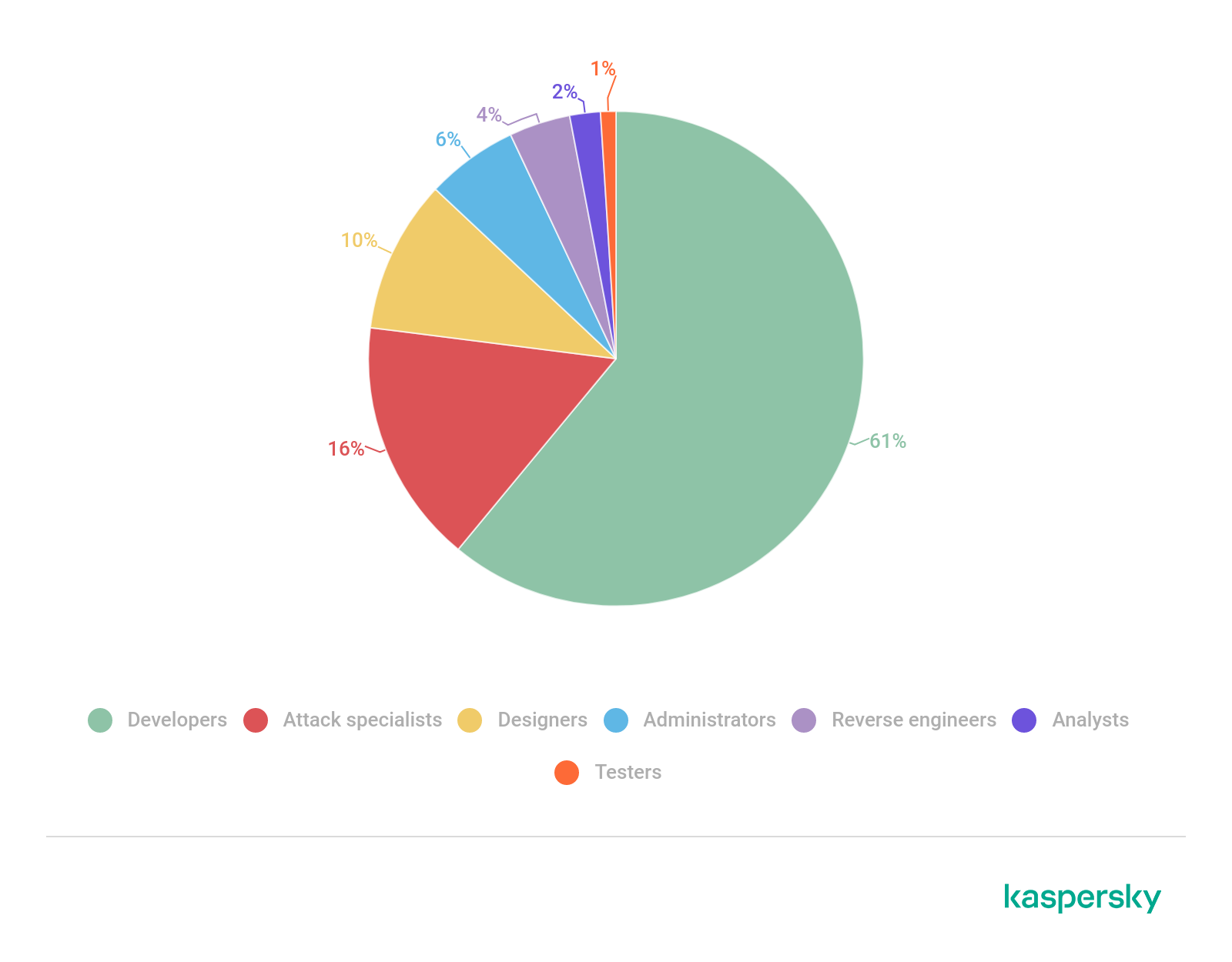
You would not be the first or the last. The truth is APT groups also need staff like any other business. The image of the lone hacker with no social skills and skin problems sitting on a dark room wearing a hoodie while being illumintated only by the glow of the laptop screen belongs to Hollyweird. ChatGPT notwithstanding, good malware does not write itself. Someone needs to be by the phone on the better phishing campaigns. Large scale attacks need monitoring, and attack servers do need to be patched. According to Kapersky, developers are in high demand in the dark web, and that has been the trend since COVID lockdowns:

Distribution of dark web job ads across specializations. source: http://kaspersky.com/

How safe are such jobs? Like everyone else, it depends. Some are scams, others are worse than that (think being kidnapped in the middle of the night either by your new employees or the FBI/NSA/Girl Scouts). After all, many of these jobs are sketchy at best; they legality depends on which nation is sponsoring the operation and which on the receiving end. But, there are organizations who treat this as a business, so they have a vested interested in having happy and productive employees who are eager to improve their software and services to levels they never thought possible. Some developers adn attack specialists are being offered $20K a month for their services; that is FAANG salary right there.

What about the company that fired you? Maybe after passing bonuses around for cuting costs, they bought the amazing cybersecurity software I mentioned in an earlier post to replace their staff. What could possibly go wrong?

Monday, January 30, 2023

The Amazing Cybersecurity Tool That Will Make You 10 Years Younger!

If you expect this post to be intelligent or thought-provoking, you may want to skip it.

Have you shopped around for some kind of tool to monitor your traffic and/or logs, adjust your firewall in response to an event such as good old exfiltration, or ensure your security and privacy policies are up to date? Or you just go to a trade show booth and ask a few questions. And you then make the mistake to leave your contact info, which then leads to and endless river emails and calls and brochures saying how their amazing product will drop ransomware dead, eliminate any and all phishing emails, patch your ssh to a release that is 2 years in the future, and all of that while shrinking the ozone layer and bringing the dodo bird back to life? Well, I decided it was time to make my own.

Ok, the software who features my code announces is vapourware, thankfully. But I thought it was time to have fun with the algamation of buzzwords salesreps call product descriptions. With my amazing tool you too can spew garbage like "Our disruptive tool implements a passwordless methodology enabling you to amplify the positive impact of the ROI of your verticals by using our continuous monitoring interface," which I do not know whether it promises things it does not deliver (vapurware?) because, to be quite honest, I do not think it really means anything. But, it sure sounds impressive for a someone of a business lean. So, if you need a laugh, give it a try. Or contribute with more buzzwords.

Repo link: https://github.com/raubvogel/cyberSecurityTool

Incidentally, this is related to a proper post I am trying to finish.