Showing posts with label personal. Show all posts

Tuesday, December 19, 2023

T-Mobile, Firefox, and Incognito mode

Most browsers have what they call a privacy or incognito mode. The idea is that it deletes any cookies and cache created by a website you ventured into once you close the browser (important step here). Note it does not replace a VPN or anonymize your traffic in any way; there are other tools for that. Still, I not only like that but I set my browsers to always start in that mode (we can talk about how to do so in a future post). Cookies is one of the ways websites use to track you (as in what GDPR would consider to be personal data), your habits, so they can know more about you than you do. I would rather not they do that. Also, shadier individuals -- even shadier than certain commercial organizations that I rather not mention -- also like them when they gain access (think phishing attacks) to your system as these files may have fun stuff like session cookies and even passwords they can steal.

Understandly, some companies do not like when I get rid of their cookies, but it is hard for them to do a thing because this is done at the user's end. However, it seems T-Mobile found a way around that: they chose to detect and block the user of Firefox running in Incognito Mode in their website:

T-Mobile message stating they do not support Firefox in incognito mode

Even though I provided the link to the official page, here is the text for those who are using a text based browser or cannot see images:

Firefox is no longer supported in private mode The Firefox browser is no longer supported in private mode on our site. To continue, please take Firefox out of private mode or choose another browser. We recommend Chrome, Safari or Edge.

Why are they singling out Firefox and derivatives (I also tried LibreWolf before writing this article)?

  • Could it be they assume everyone either uses a Windows, a Mac computer, or at least a Google-derives ystem (think Chromebook and Android), and any user running neither (I use Linux) is to be treated with mistrust?
  • Could it be that Safari stopped supporting extensions such as UBlock Origin, and Edge, well, is Edge just like the normal (as in not ungoogled) version of Chrome talks too much back to the mothership? After all, these browsers do have their versions of privacy modes, so that can't be the main issue. Nor that most sites, banks included, seem to work just fine with Firefox incognito mode.

Contacting T-Mobile led to nothing, so all I have are the speculations I made here. You too can make your own!

Friday, October 20, 2023

Helping attackers collect your personal information: spearphishing and imgur

Since this is the cybersecurity month, let's talk about one of the sure ways to help malicious people attack you or steal your identity. Of course we are talking about companies which nudge people to place their personal information in public. In today's example, we will focus on imgur. It is not that bad of a website if you take the usual precautions with your images and what you post on it. Worried the bad guys will need to put some effort, its creators offer a "Cake Day":

For those who are not able to see the image (do not consider yourselves unlucky), here is the exceprt from that email I would like you to focus on (boldface is mine):

It is customary to celebrate your Cake Day (that's your account’s creation day) by sharing something excellent with the Imgur community. Perhaps a favorite GIF, a great personal story, a meme, or some interesting information would do? Head on over to Imgur to create a new post.

"What is so bad about that?" you may ask if you skipped the first paragraph in this post. Well, let's start with a phishing attack: while most of them are half-hearted attempts to con users with badly written emails laden with links to unscroupulous websites or malware-filled attachments, the better ones are more carefully crafted and aimed at specific people. For these to work, they need to have as much information on their targets. So, knowing the personal stories and interesting information requested by imgur help with this information gathering step.

Note that this is technically not a GDPR violation as it seems (I am not going to ask the person to click on the imgur tracking link just to get more info for this blog entry) that it requires you to go through the effort to enter it and it does not require you to enter it to continue. In a future post we will show examples where that is not the case.

Wednesday, August 2, 2023

Burger King, Data Breach, French Style

As some of you may be aware of, Burger King experienced another data breach , and it is slightly different from the 2019 event. As before, personal data was exposed due to misconfiguration of their website: specifically in the Jun 2023 incident the passwords for databases and other services were stored in a publicly accessible text file. This would not be that interesting if the incident took place in their US location, where personal data of children was also exposed (Like Panera, which uses palm scanning, Burger King nudged children to enter their info so it was more convenient to order their favourite items and parents to pay without needing to have to go to the cashier), having its customers mysteriously receive emails with blank receipts, or that one of these services whose authentication info was stored in that configuration file was also our old friend Google Analytics would be forgotten in a few weeks.

What makes the special sauce special is this is happened in France, which means it is under the jurisdiction of the GDPR. Data breach investigations under those regulations are rather different than those under US laws. If the American-based multinational cannot prove it has done due diligence regarding how it protects the personal data of its customers and current/future employees, they should at least expect heavy fines: according to GDPR Art. 83(5), severe violations can cost up to 4% of Burger Kings total global revenue, which in 2021 was US$ 1.81 billion. Given the authentication was stored in plain text and children data (which may have been collected in violation of GDPR Art 8, and falls under Recital 38) is at risk, the fast food giant should not expect the French Data Privacy Authority (Commission Nationale de l'Informatique et des Libertés, or CNIL) to be as lenient towards American companies as the Irish one.

This is a very new case -- announced today in the news -- and we have no idea when Burger King reported to the CNIL (per GDPR Art. 33 they must report within 72h of learning of the incident), so we will have to wait to see how it will develop; expect the case to take at least months before the CNIL deliberates and issues fines.

Wednesday, August 31, 2022

Good Cookies, Bad Cookies, and Privacy

Cookies "banners" are a particular pet peeve of me. As in don't get me started or I will be on it for hours if not days on end. So, I will struggle a bit to get this short enough so not to kill any reader of boredom. I am not claiming I will accomplish this goal, so you have been warned.

I should also warn this article has been in the making for months; I collected a lot of real samples I need to cover the names of the companies to protect the guilty. If you recognize the site by looking at the cookie policy form, smirk and keep it to yourself.

So, are cookies bad?

That is an oversimplified question. Cookies are used to track what users are doing in a website, and that may mean storing some personal data no t only of site users but also visitors. Some of which have very valid and important applications, like ensuring users can authenticate and are the right people to access a given resource, like their bank accounts, or repository of cat videos. Then we have the ones companies are interested on, such as:

  • Which pages users go to in a given website, links they have clicked, and how long they spent on a given page. That may help them figure out which content -- primarily cat videos -- their audience seek and which ones they are avoiding. Or find out whether a given page is too convoluted, causing visitors to spend too much time and frustration in them. I can see why anyone wants to provide a website that does not suck.
  • How often they visit a website whose cookie is in their computers.
  • Which products or keywords they search for. This may tell the product lines the websites need to be providing and which ones may be taken down.
  • Geolocation and IP address. A business case is to know where its customers are coming from so they can identify markets they are not covering, and then find out why.
  • Username/password, and even address. Do not ask me why someone thought it was a clever idea to have them in cookies so forms would be conveniently filled, but they are there in the wild.

None of these are really needed to provide a service to users, so GDPR would say you must ask the visitors if they give you consent (Articles 6, 7, and Recital 32) to collect said data, and provide a way for them to remove their consent. CCPA and CPRA are less restrictive, having a set of thresholds (selling personal information of more than 50,000 Californian households, or making more than half of its annual revenue selling that data) before they are applicable and providing a the get-out-of-jail-free card (Art.9(2),e).

Some of these cookies are collected by the company running the website (first-party cookies) and others by whatever add-on they have deplopyed (third-party cookies). Google Analytics is an example of an app that creates the later; we have talked about how nicely it plays with GDPR before. However, that does not necessarily make first-party cookies better for security; but that is the topic of another article.

From a security standpoint, criminals will try to steal -- phishing emails are a popular way to deploy malware to achieve the goal -- cookies to impersonate users. So, a sensible business minimizes how much data it stores in its cookies.

The Good

  • Let's start with a nice bright example of someone who respects the privacy of its website visitors.
    It is written in plain language, gives a quick blurb on what it is being used for, and allows the user the choice to accept all the cookies, deny all of them, or do something in between (which leads to a more itemized list you can enable item by item).
  • The next one, from one of the European Union's official websites, is not as nice but at least they are trying.
    Why am I not impressed with their banner? Because it is an all-or-nothing, without a proper explanation, and mentions these "essential cookies" (is this like "essential oils?") without explaining them. Yes, if you click the link explaining how they use the cookies you realize they are not out to suck you dry of your private info, which is why it is listed here. But, I think they could do a better job given the resources they have.

The Bad

This list is but a tiny sample of my fun collection. Still, get the popcorn.

  • First we will start with one that is on the slippery slope as far as GDPR is concerned. It mentions collected data with "trusted third parties." Who are they? Google Analytics? We have talked before that you can no longer use it on a site that is accessed by European residents.
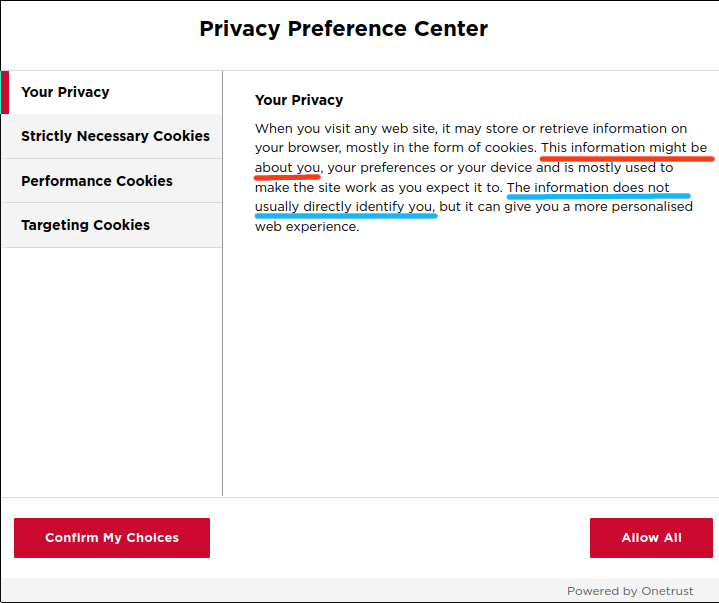
  • We really should just get serious and look at an example of conning the user. For convenience, I highlighted the relevant wording in their privacy note.
    First we have "This information might be about you" (red), which uses the "might" word to imply that it is ok because maybe the information is really not about you. Well, knowing your IP (considered by GDPR personal data), OS, browser, and other facts that we will not go over here (username?) suffice to uniquely identify you. If you use the same computer without bothering to run VPN later, they will know you are back... specially if from home as your external/public IP rarely changes if at all. But then they smother your worries claiming that "the information does not usually directly identify you" (blue). It is personal data already, sunshine.
  • Here is one from a bank that prides itself to have branches in many countries across the world.
    At first I thought the following cookie banner was just for the American market, but when connecting from Japan and Europe I still was "welcomed" by the very same banner; I do not need to say what that means. I have a ton of other examples following the same pattern, but I think we only need one to get the idea.
  • This one is a variation of the bank banner we saw earlier seen in the website of a professional society. I would not have posted it if it did not have one single word: consent.

    I must assume the reason this specific term was used is because of the language in GDPR, specifically article 7 states that if you do not have a legal reason to collect personal data, you must obtain consent from the user, who must freely give it. They seem to beleive that by having the word "consent" in the banner, they satisfied this GDPR article. However, if the only option is to surrender your private data, this consent is not freely given. Or can be easily revoked.

    "But," one can argue, "you did not consider they are probably an American-based society which does not cross the CCPA requirements by keeping the number of Californian households under the limit." How would that work? Geolocating may be hard: one of the VPN services I use has servers in California; there might be other services with servers somewhere else in the US being used by Californian citizens. Given the banner you are seeing, how would you distiguish the two cases? And besides, if this is an international (they hope they are, as one of the letters in their name stands for that) professional society, GDPR, LGDP, and APPI just to name a few are bound to be triggered. I did my Westen Europe test, and it did not switch to a GDPR-compliant cookie banner.

The Sleazy

Now we get to the really special ones, the ones that decided laughing at the privacy rights of individuals was not enough; they had to make a point.

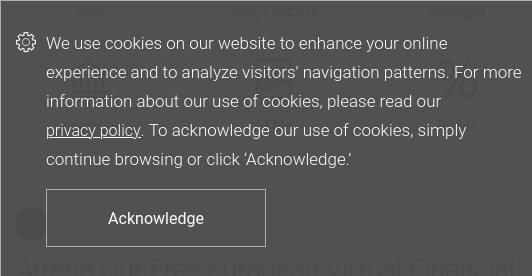
  • First jewel is what I call a BannerWall: you cannot use the website until you click on the only option ("Accept"), so site owners can then say "here! User consented to use collecting all personal info. We have the log showing the Accept button was clicked!" Hopefully you do not need to use this site, so you can just close your browser and find some other place with similar information but more privacy conscious.
    Looking at the screen capture, do you know if "Privacy Policy" and "Terms of Service" are links? No? You are not alone. Can you say hiding in plain sight?
  • But, what if you have to use the website? For instance, what if you need to log into the site to pay your utilities or rent, and they do not offer another way (mail or in person) to make said payment? Can you say coercion?

Don't Be That Guy

  • Instead of having you site collect personal data based on the location of the site visitor, assume they are all coming from the EU and build it for that, as it is one of the more restrictive ones. Make your life easier, be your website a commercial or educational/research one; we covered that a while ago.
  • What is wrong with asking users if it is ok to collect their data and tell them how you are going to use it without vague words? And by that, ask properly, not like the no-real-option seen in some of the examples above.
  • Document everything, logs included, because the world is changing and you may be audited or even fined for non-compliance. Remember, you do not need to have suffered a personal data breach before a GDPR Data Protection Authority takes legal action against you. Don't believe me? We commented on some cases earlier this year. All is needed to get that avalance running is for someone to file a complaint.

Sunday, July 31, 2022

Phone Privacy at DEFCON 30!

So our workshop on smart (I will keep a straight face here, just saying) phone privacy was accepted by the Crypto and Privacy village at DEFCON 30. If you are there, we will be presenting it on Saturday Aug 13th. As it will be only one hour, we strongly recommend to first to folow the instructions in the co-author's github-based wiki; this link is also in the official DEFCON accouncement, but it is so important we would rather mention it a few times.

So, what is it all about?

Short version: how to make your smart phone more private and why you should care. I could elaborate on that, but this post is not about the contents of the workshop: go watch it and find out!

Anything useful you want to tell us?

People have told me I have some kind of fixation with bullet points; let's not disappoint them, shall we?

  • No pictures will be taken with my phone; I will be bringing a camera -- ancient but trusty Canon ELF -- to take some pictures of the event. Yes, compared to modern smart phones its resolution is pathetic. But, it has a real zoom, using real lenses, has no understanding of wireless file transfer (great during DEFCON), and does not keep you up at night when vendor stopped creating patches for it. As this will be a real camera, not smart phone, they will not be posted in real time.
  • I was comparing our abstract with the other presenters' and realized ours is gigantic by comparison! This is not a size competition, and I realized it may e nd up being a bit of a turnoff. But, there is some logic behind the madness: we really wanted to make sure people knew what to expect and that they need to prep are for the workshop. Which leads to...
  • The "talk" part of this workshop will be rather short because the main dish is the hands-on part.
  • If you to get your hands dirty, bring an Android phone. It's two main requirements are
    • A phone you are fine if it is bricked. That can happen. And, you can find out if it does brick before attending the event because we put the setup instructions in the wiki.
    • Ideally, you want to have a phone such as Google Pixel (3 and above), OnePlus, or Fairphone. Main reason is because a lot of Android phones have a closed source "blob" of code that is only updated for a brief period of time (a year? A week?), until not longer after replacement hit the shelves. However, we are not saying "for best experience you should have bought the latest $1000 phone" (bonus point if you know where I took that from). We do think everyone should be able to strive for a private focused phone (sounds like a tag line for a product, eh?). In fact, we will have a Pixel 4 to show things, but a Pixel 3 will work just fine and can be found for around $50 if you look hard enough. When I checked this morning, an used Pixel 4 was hoving around $100.
    • FYI, I have issues with the Google Pixel phones, primarily how hard it is to repair it.
  • I would love if we could make the phone fully private from a GDPR (we tend to mention it a lot in this blog?) standpoint, but that won't happen. Compounding that, some countries do not take your efforts to protect your privacy in your phone very kindly.
  • I really would like to thank the Crypto and Privacy village for having us. This may sound the typical fake message you associate with Facebook and LinkedIn, but for a change it is real. One of the hints is that I am not starting this thread with "I am excited that;" the truth is that we have been working hard and long hours on this and the CPV crowd have put up with all of our stupid questions and rewrites and whatnots. And have not tried to strangle us!

Dude, I have an iPhone! What should I do?

Dude, I have no clue; I do not have an iPhone to research on!

Thursday, June 30, 2022

You may Unsubscribe, but give me your Personal Data

I signed up for some online three-hour class two weeks ago. It was good, and the instructor did end it with the usual upsale you expect in some of these classes. I cheefully turned it down.

Also as expected, I started receiving emails from this instructor about new classes and programs. I ignored them for a week until last Monday I decided I was getting too many sales emails from him and wanted to cut it down. So I clicked on the "click here to unsubscribe to this list," which is a trackable link as expected: I would expect the link to know I am the one who want to be removed from that list.

Well, the link led me to the following page; I did remove the top banner identifying the 3rd party company being used and my name and email, which were automagically autofilled. But below is what the form looks in all of its glory:

This form caused a few questions to pop in my head:

  1. Why is there no reference to the instructor, his business, or something that refers to the mailing list? It is not like I erased that before posting. This sure looks like a great phishing page, but what do I know?
  2. Note that it asks for my address and phone number. Why does it need that? I mean, when I signed up for the class I did not need to provide either; so why now?
  3. Who is collecting this information: the instructor or this third party?
  4. Why is it called Update Information? I am here to unsubscribe to a mailing list!
  5. Why is a button called Update Information the default choice in a page you supposedly use to leave a mailing list? This is a classic example of Dark Pattern in use, steering the user to select a less privacy conscious option.
  6. Why would I want to update personal information to unsubscribe to a mailing list? In fact, let me put my GDPR hat and say there is no lawful case for this form to collect (and process) personal data beyond email (Articles 5 and 6, and recital 39). I have belonged to many mailing lists that either require just the email or an username/password pair to leave them.
  7. Given there is no lawful case to collect the personal data mentioned in the previous question, the only other option is consent. GDPR Article 7 is very particular about how consent should be given and taken away. Does this form's request for consent is presented in a clear manner, distiguishing it from other items in the same form (Art 7.2)? And, does it indicates a way to withdraw this consent in a manner that is easy to do so (Art 7.3)? Finally, is it freely given (Art 7.4)? Looking at the form I have no idea if I am freely giving it or I am required to, so the answer is no.
  8. Besides the company's banner, which is not a link to their website, and the buttons below, is there a way to interact with this website (say, to contact someone) and its owner? As far as I can see, none.

Given all the questions raised above, it seems that the safest and most privacy-conscious way to leave this mailing list is to tell my mail client to label amy future email from that list as spam.

Moral of the Story

If you are going to provide some kind of mechanism for people to unsubscribe to your newsletters, please keep it simple, clear, and transparent. If it also doubles as a way for users to update their info, label what is required for unsubscribing and what is used for updating profile/account info. And, do not try to sneak collecting of personal data in.