Showing posts with label payload. Show all posts

Wednesday, December 21, 2022

FBI: Use ad blockers to protect against brand impersonation

Today the FBI just announced, cyber criminals (which are easily recognizable according to the news and many websites for their predilection to wearing hoodies even in the summer) "are using search engine advertisement services to impersonate brands and direct users to malicious sites that host ransomware and steal login credentials and other financial information." Well, there are two parts for that:

Search engine advertising services

We are talking here about Search Engine Optimization (SEO), where you do magic tricks to move your website as close to the top search results since most people will not look more than 2 search page results for something. There are thousands of companies who make money helping businesses with this, including courses, Ez-Button products, and services ("give your url, what do you think you do, and we will take care of the rest for a price). What they are mentioning here is weaponization of that, which has been known as SEO poisoning since 2020. An example of that is when it was used to distribute BATLOADER malware.

Brand Impersonation

This is a traditional phishing tactic and relies on techniques such as (not exhaustive list):

  • typosquatting, which creates a fake website whose domain sounds close enough (within a typo or two) to that of a well known website. They pray on people like me, who mistypes a lot: if the browser returns a page that looks like the one victims expect instead of an error page, they may never noticed they are in the wrong site. This kind of attack is old enough -- yet still quite effective -- to be metioned in the 1999 Anticybersquatting Consumer Protection Act (ACPA)
  • URL Shortening, which converts long descriptive links into short sometimes cute ones that provide you no idea of where they really came from. Good ad blockers will check these links against lists of known spammers and block them, as shown in the picture below where UBlock origin does not allow a shortened url identified by the Perter Lowe's list of known domains serving ad content, tracking users, spyware servers, and occasionally malware and other nasty purposes.
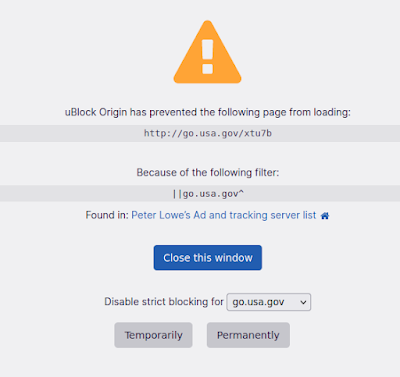
    go.usa.gov being blocked by UBlock origin
  • IDN homograph attack, an attack where tsome of the characters in the url of a website are replaced by similar (think 1 vs l) characters, or those from a different alphabet that look the same in a HTML-formatted email. As a result this can be seen as a more sophisticated version of typosquatting.
This leads the victim to the website containing the malware (think ransomware), some way to steal the victim's login crendentials, or a combination of both.

Is this a new form of attack?

Nope.

Are ad blockers enough to stop this kind of attack?

There are no magic pills. They can only do so much. I recommend stopping and checking the url for a search engine result that smells suspicious. Some of the attacks mentioned above -- typosquatting and homograph -- can even be stopped by pasting the url in a proper text editor (think Notepad for windows or vim in Linux) that will not try to import fonts, and then just looking at them. With that said, I do use UBlock Origin myself; the picture on the top of this article is mine.

Should I panic and flail my arms while running in circles?

You could; if you do, make a video of it.

Do you have links for those apps/extensions you mentioned?

Monday, September 26, 2022

Phishing Is Too Easy - 3

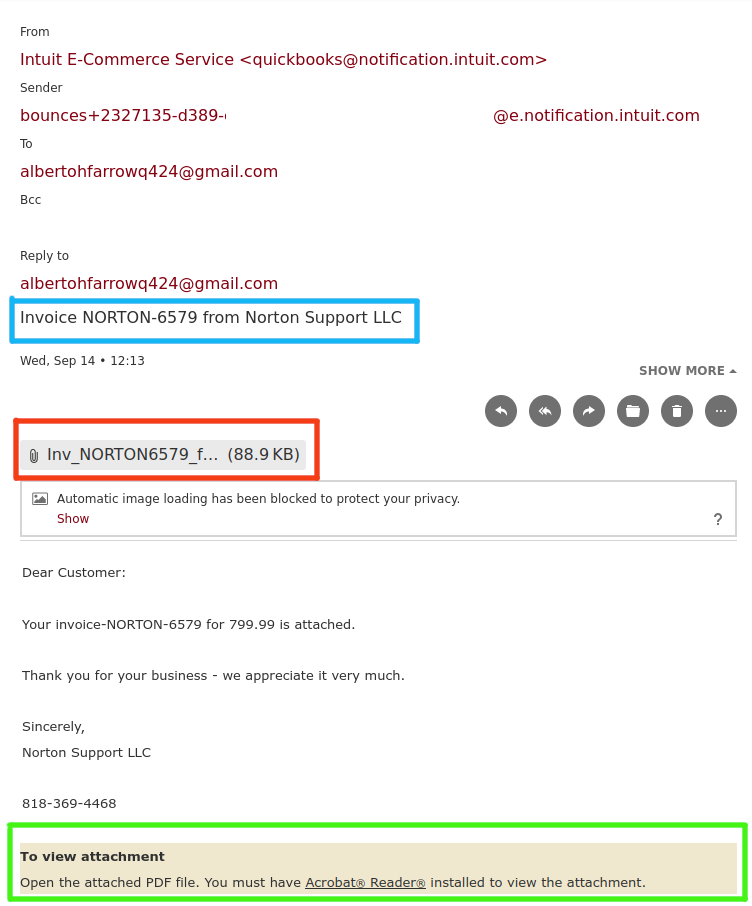
Last week I received another traditional phishing email; apologies for the lack of images because my email account is setup not to load externally attached pictures. Here it is, with my address removed:

Phishign email disguised as an invoice with attached PDF pretending to come from Norton

Yes, this is pretty much a variation of the last one I commented on months ago, namely:

  • It is an invoice for some product, in this case it implies to be some kind of Norton product.
  • It creates a veil of credibility by alluding itself (blue box) in a rather half-ass way to be related a real company. Note it claims to be "Norton Support LLC," which I have no idea who it may be. Since the average person probably heard of Norton, who sells an antivirus and other security products, it is easy for said person to associate both.
  • Still on the credibility standpoint, the sender address is supposedly from quickbooks (I did not bother to check the header). Yes, a large company right Norton would not be using quickbooks to send its bills. However, if you have to deal with purchasing you probably have seen invoices from smaller business which use the online quickbooks site; when they send their invoices, their invoices will have "<quickbooks@notification.intuit.com>" as the email. But, we hope they will look more like "Something Of Doom LLC <quickbooks@notification.intuit.com>" instead of "Intuit E-Commerce Service <quickbooks@notification.intuit.com>"; I think the later is not the default value, but it sounds credible enough.
  • To create the urgency, the invoice is for $800. That will make someone's heart beat a bit faster and immediately want to open the attached PDF file (red box) to find what this invoice is all about. This is a bit lazier than the last phishing email we posted about as some mail services will disable attachments with macros in hope to block malicious payloads. However, most of the mail services do not do that; mine could not be bothered and told me if I want to see it, and be properly infected, I need to have Adobe Acrobat Reader (green box). Since my mail service does not automagically open anything, I have some extra time to read the email and decide what I want to do next.
  • It provides a number which may be tied to the phisher (VoIP?) so if the frantic recipient of the email calls, the phisher (we called him Peggy in the last phishing post) can then social engineer his way into the victim's computer.
  • The return address is a typical quasi-randomly created Gmail one; they could not be bothered with making it sound like it came from a billing department as it claims to be.

How effective it is? I think it depends on where people will focus on. The phishers hope their marks will see the value of the invoice -- $800 -- and immediately open the pdf to find out what is going on. The best thing to do here is stop -- but not stop/drop/roll as you are not on fire -- whenever you see something suspicious, specially when it claims to be urgent. Then ask yourself if you expected an invoice from Norton. Then look at the email addresses and see if they are not overly suspicious.

Remember: phishers are lazy, and they hope you are equally lazy!

Saturday, March 12, 2022

Phishing Is Too Easy - 2

A long while ago I posted here about how easy it was to phish. Yes, it was that long; where has time gone?

Anyway, some phishers seem to have decided that embeding malicious code as payloads into either the email itself (thanks to HTML-aware emails) or into attached documents -- Microsoft Word/Excel/Powerpoint documents, PDF files, or even some image formats -- was a bit too time consuming. Or, it was being picked up by the usual mail scanners and deleted. So, what can they do? Well, elicit the help from the user! Ok, you may argue that all phishing campaigns rely on social engineering, and you would be correct. But, how can that be craft to evade scanners once the users are conned? Let me answer that by presenting this gem of phishing email, which I added to my collection a few days ago:

Phishing email which does not have its payload as an attachment, but contains a phone number to contact the attacker and get instructions on how to download and install the maware.

At first glance, it seems this email will be innefective, as it starts rather carelessly:

  1. The return address is a typical quasi-randomly created Gmail one; they could not be bothered with making it sound like it came from a billing department as it claims to be.
  2. Also notice they do not even specify the company they are hailing from; they just said something about a Billing Department.
  3. This email from some billing department from an unknown company is about the purchase of McAFEE Total 360.

What seems to be carelessness is actually genius. You see, most people who read this email will not pay attention to the return email address and lack of a business name. All they will focus on is the 3rd item listed above: they just received what seems to be a bill for a software they can't remember ordering. What to do?

There is a phone number prominiently on the bottom of the email. That is the clever move. I expect the next moves to play out as follows:

  • Customer's (the mark) mind will focus on, as mentioned above, the fact they are seeing an unexpected $300 bill. Why did they receive it? Was that an accident? Did someone with a similar name ordered it? This is the fear component of the phishing email.
  • It says the charge mode is "Auto Debit!" I too have no idea of what "Auto-Debit" means. Maybe they wanted to say auto renewal using a debit card. But the point is these words create a sense of urgency, which is another component of a good phishing email.
  • So, they call the phone number to fing what is going on. The person on the other end, who is an Eastern European man called Peggy (bonus points if you know which old ad I am alluding to), will maybe ask for the mark's personal (before you get excited, GDPR does not apply to criminals since by definition they do not follow the law) and credit/debit card information to "confirm" (read: store and sell) if that was the card used. However, it would make more sense if he...
  • Peggy will probably ask the mark to go to a website and then download and install something in the mark's computer (ideally a work one) to check if the McAFEE program is installed and then uninstall it. As expected, that is a trojan horse to help deploy the real payload. The good thing about being on the phone is that Peggy can help the mark work around the malware protection software in place so the trojan can be successfully installed.

Recommendation

If you receive such email, take a break before acting on it. Then, if you received it at work, reach out to your IT security people and ask for help. Relying on software to magically find and delete such emails does not work all the time. You the user is the most important line of defense.

Saturday, April 29, 2017

Capturing Network Traffic in Windows Without Wireshark

One of the things that drives me nuts in the Windows community, articles found in help web sites included, is the idea that to solve any problem you need download something and run it. And ideally something off a shady site that must be run in Admin mode. Packet capturing is one example.

Yes, I do know of Wireshark, I like it a lot and think it is a brilliant program; the fact you can run it in Linux, OSX, and Windows is a nice touch. But, like everything else it has its place. So, where is that in my opinion? I think it is great for:

  • Packet inspection in a nice visual way
  • Following all the packets that make a stream. Ex: if you found a file being transfered, you can find every single packet involved.
  • Packet filtering. yes, you can do that in tcpdump, but doing it visually and colourfully is so much nicer. Looking for a rogue DNS in a haystack of data? Just tell wireshark to mark any DNS response in purple!
  • The massive list of non-TCP/UDP traffic (say, USB) it can handle.
  • Deploying a tap or switch port mirror.
  • Lots
  • Having in your handy pentest/security laptop.

Now, where do I think it should not be used? Servers. The way I was taught in kitty school is that you should only install in the server the programs you need to provide the services said server is supposed to offer (and to secure that). For instance, some good explaining is required to justify running a VPN service in a web server specially in this age of containers. About normal packet capturing, I understand the occasional need for that in a server, but why installing wireshark in it? If its operating system is Linux, there is a perfectly good tcpdump avaiable: you install it, do what you need, and then remove it after the task is done; there is no need for leaving it in the server "just in case." But, what about a Windows server? There is no tcpdump port on it, so wireshark is the logical alternative.

Or is it? What if I told you Windows has a built-in solution?

Enter netsh trace, which allows you to record network traffic without downloading an extra program. It is not as sophisticated as tcpdump but if all we want is to capture packets, it work just fine. It is command line, but I think we can handle that. Here are the avaiable options:

PS C:\Users\user> netsh trace ?

The following commands are available:

Commands in this context:
?              - Displays a list of commands.
convert        - Converts a trace file to an HTML report.
correlate      - Normalizes or filters a trace file to a new output file.
diagnose       - Start a diagnose session.
dump           - Displays a configuration script.
help           - Displays a list of commands.
show           - List interfaces, providers and tracing state.
start          - Starts tracing.
stop           - Stops tracing.

To view help for a command, type the command, followed by a space, and then
 type ?.

PS C:\Users\user>

Recording

The way I usuall start recording network traffic is (and, yes you need to run it as an Admin)

netsh trace start persistent=yes capture=yes tracefile=packets.etl

Where

  • persistent: Keep on logging after a reboot. Default is persistent = no
  • start: Start packet capture. To stop it, netsh trace stop.
  • tracefile: Is the name (and path) of the file the packets will be saved to. If you just enter the filename, it is saved in the same directory/folder you ran the command from. It is comparable to the -w flag in tcpdump. I strongly suggest to save this file somewhere only you (or the Admin) has access to; there are very few times when having a packet capture file available for all makes sense.

Other useful options:

  • maxsize: max size of log file before it gets overwritten. maxsize=250 (MB) is the default; if you set maxsize = 0 it would not stop filling it up until running out of disk space (unlimited).

Inspecting

When you finish capturing you will notice that you now have two new files:

Mode                LastWriteTime         Length Name
----                -------------         ------ ----
-a----        4/24/2017   3:59 PM         650033 packets.cab
-a----        4/24/2017   3:58 PM         524288 packets.etl

For this discussion we will only care about packets.etl. Next step is to take the file out of the server to a system where we can analyze it with wireshark (the right tool for the job). Unfortunatelty Wireshark as of the time this article was created (April 2017) can't read a .etl file; more info on a wireshark bug report that started on 2011 and was last updated 2 years ago. The only way I know to convert is using the Microsoft Message Analyzer, which means you need to install it, import packets.etl, and then export it (Save As->Export) as a .cap file. You could argue that if we have Microsoft Message Analyzer, there is no reason to add wireshark, but while I know how to use wireshark I only know how to use the Microsoft product to convert the packet to a format wireshark can use. I do wish there was a way to do this step from the command line; if someone knows, do post in the comments.

What about real time monitoring?

Do you remember the part about tap or switch port mirror? That is what I would do before putting wireshark in the server. If you have to install wireshark in the Windows server, do keep track of the extra programs you also need to install and ensure they are all removed after you are done.

Tuesday, March 29, 2016

Phishing is too easy

I only remember going in a boat fishing once. And did not catch anything. And had to help with engine problems all the way back to the dock. So I can't claim to be a fisher for I never learned and endured the hours of being pooped by the mocking seagulls while waiting on fishes who were much smarter than we give them credit for fall for the lure and get stuck on the shiny hook by the end of the line. There are many man, women, and children who are very successful in the way of the fish; I am not one of them.

Phishing is a completely different story. It is very easy to do. You can call it caveman-easy but you would be then insulting the cavemen. And yet, it is extremely effective.

Businesses (should) worry about being hacked since a breach costs them money and reputation. So, they (should) do their best to prevent the bad guys to get in by patching servers and services and deploying firewalls and making sure their mail and web servers are will not let anyone try to log in. Of course their problem is exacerbated because while they need to protect against any possible attack, the attacker just need to find one weak point to get in. And the easiest way to achieve that is through social engineering.

Basic Phishing Recipe

  1. Get a free website account. This is kinda important if you are providing a link in the email for your victims to click on. Some of them allow you to use very little or no verifiable info to create said account. So you can use really bogus info.

    Now, if you are doing Microsoft Office Macro attack, this still might be a good idea since it insulates your real addresses. Remember, it is not hard to create code to send collected data from the site to somewhere you want to collect the data.

  2. Select your target. You think that means to select the business you want to attack. Well, you are wrong; thanks to the crusade to push everything to the cloud you really need to think on a larger scale and go for who hosts those companies' emails. Based on what I have seen, the commercial google mail or the Microsoft equivalent (Office 365) are the best bets. First, a lot of businesses are using them, which mean you have to only hit one single target.
  3. Decide how you are going to deploy your payload. Are you going to send an attachment (most of the time a Word document) or a url? What about an executable (badly) disguised as an image? I say badly because I have seen a lot of attachments whose extension is simply changed or have an image extension appended to the filename because of how Outlook presents those attachments.
  4. Write the email. I would love to say this requires you to be creative and spend hours or days to recon the target company to figure out corporate colours, normal email format and language, and even the proper email addresses before launching an email-based attack. The reality is that is not necessary unless you craft it so badly the target's detection system will flag your email.

    People will fall for those emails even if it is badly written. Now, I am not saying everyone will, but those who are really busy and have to be reading and replying to emails every day -- people who order stuff from vendors all the time -- are rather likely to do so. They do not have time to stop and think whether the email makes sense. They will scan, made a decision, act on it, and then move onto the next target.

  5. HTML is your friend. The vast majority of people use email clients that will render a HTML-based email. If they use Office 365, you can disguise your attack links as
    <a href=https://shadysite.com/malware.exe>https://www.safeurl.com</a>
    Sometimes if you hover the link the real url will be shown, sometimes it does not.

References