Showing posts with label email. Show all posts

Thursday, December 1, 2022

Phishing Is Too Easy - 5: Season to be Scammed Edition

Good news everyone: There are phishers who take pride in their work

We continue our series on phishing emails. I am glad to say a phisher heard my plead and stepped up to the challenge before Black Friday ended!

We have here an email that claims to be coming from American Express which states there is a problem in my card and I need to click on the link to find out. Let's ignore the fact of wether or not I have an American Express card or this article would have ended right here. The timing was good: lot's of people are going crazy purchasing milliong of trinkets online, and then they receive an email saying their card has a problem. Did they go over the limit? Was it's information stolen?

Good show old boy!

If I had such a card, what should I do next? The answer depends on how much effort we want to put in this:

For the impatient

You can't see in the picture but the From: field looks like this:

From: American Express MyCredit Guide <transunion@em-tuci.transunion.com>
Why would TransUnion, a US consumer credit reporting company, be sending emails for American Express? This should be enough for us to immediately drop this email and move on.

For the willing to spend a bit more time

First of all, when in doubt of whether a suspicious email is legit or not, find the official contact number/email of the company in question and reach out to them. In this case, I did call them. American Express said if they send an email, it will contain

  • Your name.
  • The last 4 digits of your card.
This email only contains the first name, so per American Express, it is at best suspicious. They did ask me to forward it to spoof@americanexpress.com, which I did.

For those with time to deep dive and ponder on the implications

Some of you may remember that TransUnion suffered a data breach recently. What if this data is being used to create targeted phishing email? And, what if the criminals are able to either impersonate transunion email addresses or still have access to their servers so they can send emails through their servers? To answer that we need to look in the email header:

ARC-Authentication-Results: i=1; mx.google.com;
       dkim=pass header.i=@em-tuci.transunion.com header.s=scph0919 header.b="ou/BSRUG";
       spf=pass (google.com: domain of msprvs1=19329inrhx0ms=bounces-266758@bounce.em-tuci.transunion.com 
designates 147.253.210.36 as permitted sender) smtp.mailfrom="msprvs1=19329inrhX0MS=bounces-266758@bounce.em-tuci.transunion.com";
       dmarc=pass (p=REJECT sp=REJECT dis=NONE) header.from=em-tuci.transunion.com
Return-Path: <msprvs1=19329inrhX0MS=bounces-266758@bounce.em-tuci.transunion.com%lt
Received: from mta-210-36.sparkpostmail.com (mta-210-36.sparkpostmail.com. [147.253.210.36])
        by mx.google.com with ESMTPS id 62-20020a630141000000b004778207ac4dsi7561754pgb.396.2022.11.26.12.06.50
        for Clueless Sheep
        (version=TLS1_2 cipher=ECDHE-ECDSA-AES128-GCM-SHA256 bits=128/128);
        Sat, 26 Nov 2022 12:06:50 -0800 (PST)
Received-SPF: pass (google.com: domain of msprvs1=19329inrhx0ms=bounces-266758@bounce.em-tuci.transunion.com designates 147.253.210.36 as permitted sender) client-ip=147.253.210.36;
Authentication-Results: mx.google.com;
       dkim=pass header.i=@em-tuci.transunion.com header.s=scph0919 header.b="ou/BSRUG";
       spf=pass (google.com: domain of msprvs1=19329inrhx0ms=bounces-266758@bounce.em-tuci.transunion.com designates 147.253.210.36 as permitted sender) smtp.mailfrom="msprvs1=19329inrhX0MS=bounces-266758@bounce.em-tuci.transunion.com";
       dmarc=pass (p=REJECT sp=REJECT dis=NONE) header.from=em-tuci.transunion.com
X-MSFBL: fXbaPXh+ne/E8ZM3Y6OyFt9TLlavvIujqeENrG6IrbY=|eyJyIjoicmF1YnZvZ2V sQGdtYWlsLmNvbSIsIm1lc3NhZ2VfaWQiOiI2MzgxZGE3MTgyNjM0YmI3ZmY3ZiI sInN1YmFjY291bnRfaWQiOiIwIiwiY3VzdG9tZXJfaWQiOiIyNjY3NTgiLCJ0ZW5 hbnRfaWQiOiJzcGMifQ==
DKIM-Signature: v=1; a=rsa-sha256; c=relaxed/relaxed; d=em-tuci.transunion.com; s=scph0919; t=1669493210; i=@em-tuci.transunion.com; bh=g54YI3MysS1MVd8EV8xjgfkc97E2Z2epcQAJzoXhCkw=; h=To:Message-ID:Date:Content-Type:Subject:From:List-Unsubscribe:
	 From:To:Cc:Subject; b=ou/BSRUG3cUbJKbYUZ1LVr3J0Z3xP7nFJPUjPutaxPAlyQU2bd2vFDbfNHxdU0LbB
	 HxEwc9YzSTrKnrbFfjcLwSxfZk48k6br1t4DI9fsDgWAimdohpxIGKK6ukD2NE1q/L
	 SESZw9WVeXNvoEVjsYIPh67accGucYF32laIH8ICsqeopmxSoaxsrjHBa/MBjqYZAz
	 8r+jHG+Ilr/QzlJ0Lq5rGA/hJGnHR3lPbkuVRFBsrnV9841IbsIpQDVOUdW172sQbQ
	 zZ+JErYKYYvpwmjqd6A4XMPu3TG9QcymMjHHYqcXRmtL4OdKzB8GKtksDI4uLakZkw
	 8HR0NVWvPUjzQ==

At first glance it seems the email came straight from TransUnion, specifically from the host called em-tuci.transunion.com. But, then we find the most interesting entry in the above header exerpt (which I highlited):

Received: from mta-210-36.sparkpostmail.com (mta-210-36.sparkpostmail.com. [147.253.210.36])

It seems this email came from mta-210-36.sparkpostmail.com, whose IP (147.253.210.36) has been whitelisted by bounce.em-tuci.transunion.com as a sender. From there it ends up in the Clueless's gmail account relying on transunion's server's relationship with google's.

But, who is SparkPost?

Short version, it is a mass emailing service. They seem to be well-known enough for Microsoft to have instructions on how to access them using a connector from within Azure. Does that mean they were compromised or the attackers obtained the TransUnion's credentials to use this service?

So, is this Spearphishing via Service (T1566.003)?

If we read the MITRE ATT\&CK® entry, sounds like a very good possibility.

Some kind of Conclusion

Even though this phishing email was much more well thought out than that insult mentioned in the last entry of the series, if you stop and examine it -- without first clicking on its links -- you can still identify it as such rather quickly, without needing to tear down through its raw contents. Don't get me wrong: doing that is fun, but if you are trying to go trhough your daily routine and see this email, in less than 5 minutes you can make a call of whether it is legit or suspicious.

Ok, more if you have to wait on the phone listening to elevator music to talk to a company to verify if they sent said email.

Friday, November 25, 2022

Phishing Is Too Easy - 4: Season to be Scammed Edition

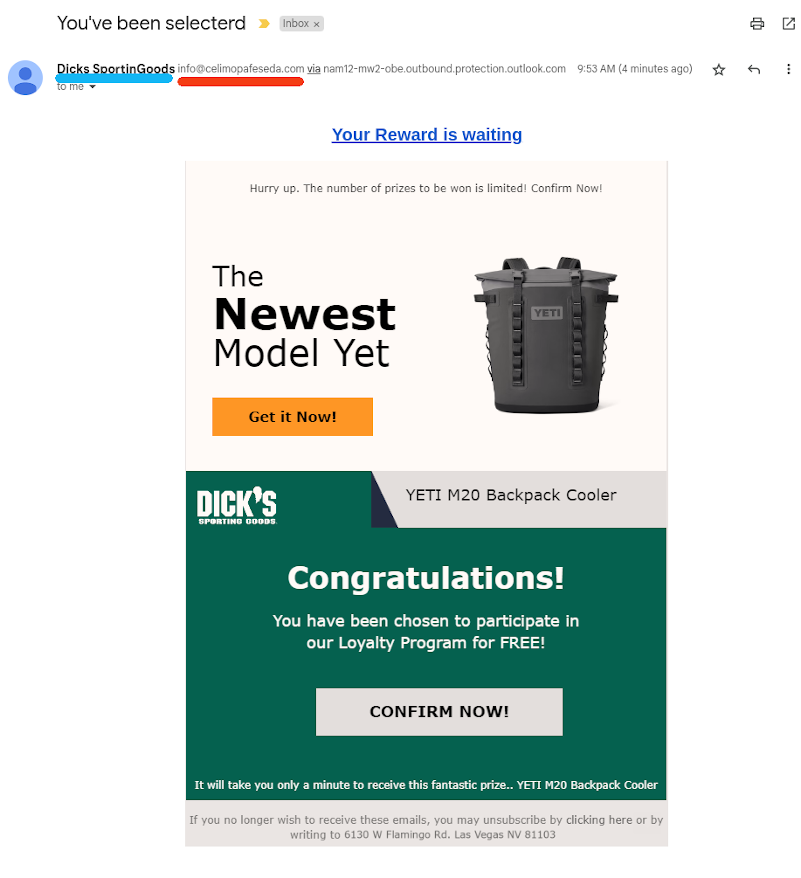
It is Black Friday! And We are in the Season to be Scammed! A few moments ago (I am typing this as fast as I can) I received the following phishing email:

Phishing email pretending to be dicks sporting goods. Description of what to look out for is written below

It's call to action is the claim Dick's (insert jokes here) Sporting Goods decided out of the blue to give me a Yeti cooler if I just click on the "Confirm Now!" link. I usually would spend the time (see the last phishing article I wrote) and look at the email's source to see if it has any interesting teltale signs of phishing. But, this phisher is so lazy he does not deserve a deep dive on the email. So, let me count the ways this is a scam:

  1. Why would Dick's want to send me a cooler? They do have a store here but I make my point not to go there. So they do not know I exist... unless they bought my name off a list. If that is the case, I feel I should ignore them even more.
  2. Why is the name in the return address "Dicks SportinGoods" (blue line) instead of "Dicks Sporting Goods"?
  3. Why is the domain of the return address celimopafeseda (red line)? I could say that I could not find that domain registered anywhere I bothered to look (spent some extra time I really did not need to for this article), but let's be honest: this has nothing to do with dicks.
  4. If I had spend time and looked at the email's header, I would have seen it was sent through outlook.com. But I will not. I am not saying mailed through Outlook is a telltale of a phishing email but I do not like how the path it took while inside their network is obscured. Still, short post this is.

As a result, I think we can safely label this as phishing and move on.

I am disappointed for the lack of pride this phisher has. Do you think some other phisher will redeem my faith on them or is this the best I can expect this Friday?

Monday, September 26, 2022

Phishing Is Too Easy - 3

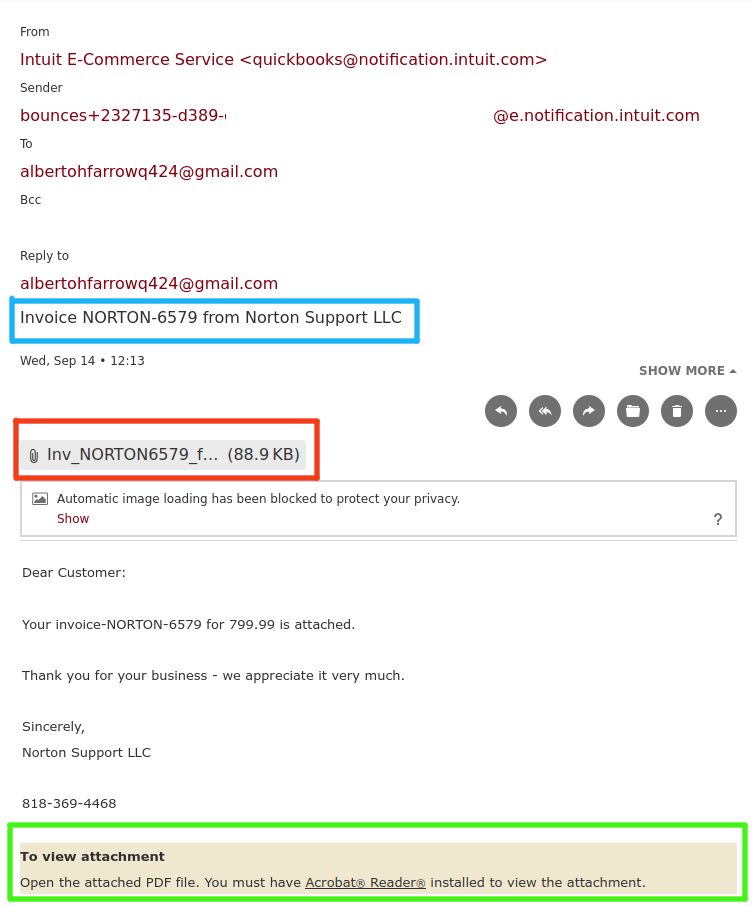
Last week I received another traditional phishing email; apologies for the lack of images because my email account is setup not to load externally attached pictures. Here it is, with my address removed:

Phishign email disguised as an invoice with attached PDF pretending to come from Norton

Yes, this is pretty much a variation of the last one I commented on months ago, namely:

  • It is an invoice for some product, in this case it implies to be some kind of Norton product.
  • It creates a veil of credibility by alluding itself (blue box) in a rather half-ass way to be related a real company. Note it claims to be "Norton Support LLC," which I have no idea who it may be. Since the average person probably heard of Norton, who sells an antivirus and other security products, it is easy for said person to associate both.
  • Still on the credibility standpoint, the sender address is supposedly from quickbooks (I did not bother to check the header). Yes, a large company right Norton would not be using quickbooks to send its bills. However, if you have to deal with purchasing you probably have seen invoices from smaller business which use the online quickbooks site; when they send their invoices, their invoices will have "<quickbooks@notification.intuit.com>" as the email. But, we hope they will look more like "Something Of Doom LLC <quickbooks@notification.intuit.com>" instead of "Intuit E-Commerce Service <quickbooks@notification.intuit.com>"; I think the later is not the default value, but it sounds credible enough.
  • To create the urgency, the invoice is for $800. That will make someone's heart beat a bit faster and immediately want to open the attached PDF file (red box) to find what this invoice is all about. This is a bit lazier than the last phishing email we posted about as some mail services will disable attachments with macros in hope to block malicious payloads. However, most of the mail services do not do that; mine could not be bothered and told me if I want to see it, and be properly infected, I need to have Adobe Acrobat Reader (green box). Since my mail service does not automagically open anything, I have some extra time to read the email and decide what I want to do next.
  • It provides a number which may be tied to the phisher (VoIP?) so if the frantic recipient of the email calls, the phisher (we called him Peggy in the last phishing post) can then social engineer his way into the victim's computer.
  • The return address is a typical quasi-randomly created Gmail one; they could not be bothered with making it sound like it came from a billing department as it claims to be.

How effective it is? I think it depends on where people will focus on. The phishers hope their marks will see the value of the invoice -- $800 -- and immediately open the pdf to find out what is going on. The best thing to do here is stop -- but not stop/drop/roll as you are not on fire -- whenever you see something suspicious, specially when it claims to be urgent. Then ask yourself if you expected an invoice from Norton. Then look at the email addresses and see if they are not overly suspicious.

Remember: phishers are lazy, and they hope you are equally lazy!

Saturday, March 12, 2022

Phishing Is Too Easy - 2

A long while ago I posted here about how easy it was to phish. Yes, it was that long; where has time gone?

Anyway, some phishers seem to have decided that embeding malicious code as payloads into either the email itself (thanks to HTML-aware emails) or into attached documents -- Microsoft Word/Excel/Powerpoint documents, PDF files, or even some image formats -- was a bit too time consuming. Or, it was being picked up by the usual mail scanners and deleted. So, what can they do? Well, elicit the help from the user! Ok, you may argue that all phishing campaigns rely on social engineering, and you would be correct. But, how can that be craft to evade scanners once the users are conned? Let me answer that by presenting this gem of phishing email, which I added to my collection a few days ago:

Phishing email which does not have its payload as an attachment, but contains a phone number to contact the attacker and get instructions on how to download and install the maware.

At first glance, it seems this email will be innefective, as it starts rather carelessly:

  1. The return address is a typical quasi-randomly created Gmail one; they could not be bothered with making it sound like it came from a billing department as it claims to be.
  2. Also notice they do not even specify the company they are hailing from; they just said something about a Billing Department.
  3. This email from some billing department from an unknown company is about the purchase of McAFEE Total 360.

What seems to be carelessness is actually genius. You see, most people who read this email will not pay attention to the return email address and lack of a business name. All they will focus on is the 3rd item listed above: they just received what seems to be a bill for a software they can't remember ordering. What to do?

There is a phone number prominiently on the bottom of the email. That is the clever move. I expect the next moves to play out as follows:

  • Customer's (the mark) mind will focus on, as mentioned above, the fact they are seeing an unexpected $300 bill. Why did they receive it? Was that an accident? Did someone with a similar name ordered it? This is the fear component of the phishing email.
  • It says the charge mode is "Auto Debit!" I too have no idea of what "Auto-Debit" means. Maybe they wanted to say auto renewal using a debit card. But the point is these words create a sense of urgency, which is another component of a good phishing email.
  • So, they call the phone number to fing what is going on. The person on the other end, who is an Eastern European man called Peggy (bonus points if you know which old ad I am alluding to), will maybe ask for the mark's personal (before you get excited, GDPR does not apply to criminals since by definition they do not follow the law) and credit/debit card information to "confirm" (read: store and sell) if that was the card used. However, it would make more sense if he...
  • Peggy will probably ask the mark to go to a website and then download and install something in the mark's computer (ideally a work one) to check if the McAFEE program is installed and then uninstall it. As expected, that is a trojan horse to help deploy the real payload. The good thing about being on the phone is that Peggy can help the mark work around the malware protection software in place so the trojan can be successfully installed.

Recommendation

If you receive such email, take a break before acting on it. Then, if you received it at work, reach out to your IT security people and ask for help. Relying on software to magically find and delete such emails does not work all the time. You the user is the most important line of defense.

Tuesday, March 29, 2016

Phishing is too easy

I only remember going in a boat fishing once. And did not catch anything. And had to help with engine problems all the way back to the dock. So I can't claim to be a fisher for I never learned and endured the hours of being pooped by the mocking seagulls while waiting on fishes who were much smarter than we give them credit for fall for the lure and get stuck on the shiny hook by the end of the line. There are many man, women, and children who are very successful in the way of the fish; I am not one of them.

Phishing is a completely different story. It is very easy to do. You can call it caveman-easy but you would be then insulting the cavemen. And yet, it is extremely effective.

Businesses (should) worry about being hacked since a breach costs them money and reputation. So, they (should) do their best to prevent the bad guys to get in by patching servers and services and deploying firewalls and making sure their mail and web servers are will not let anyone try to log in. Of course their problem is exacerbated because while they need to protect against any possible attack, the attacker just need to find one weak point to get in. And the easiest way to achieve that is through social engineering.

Basic Phishing Recipe

  1. Get a free website account. This is kinda important if you are providing a link in the email for your victims to click on. Some of them allow you to use very little or no verifiable info to create said account. So you can use really bogus info.

    Now, if you are doing Microsoft Office Macro attack, this still might be a good idea since it insulates your real addresses. Remember, it is not hard to create code to send collected data from the site to somewhere you want to collect the data.

  2. Select your target. You think that means to select the business you want to attack. Well, you are wrong; thanks to the crusade to push everything to the cloud you really need to think on a larger scale and go for who hosts those companies' emails. Based on what I have seen, the commercial google mail or the Microsoft equivalent (Office 365) are the best bets. First, a lot of businesses are using them, which mean you have to only hit one single target.
  3. Decide how you are going to deploy your payload. Are you going to send an attachment (most of the time a Word document) or a url? What about an executable (badly) disguised as an image? I say badly because I have seen a lot of attachments whose extension is simply changed or have an image extension appended to the filename because of how Outlook presents those attachments.
  4. Write the email. I would love to say this requires you to be creative and spend hours or days to recon the target company to figure out corporate colours, normal email format and language, and even the proper email addresses before launching an email-based attack. The reality is that is not necessary unless you craft it so badly the target's detection system will flag your email.

    People will fall for those emails even if it is badly written. Now, I am not saying everyone will, but those who are really busy and have to be reading and replying to emails every day -- people who order stuff from vendors all the time -- are rather likely to do so. They do not have time to stop and think whether the email makes sense. They will scan, made a decision, act on it, and then move onto the next target.

  5. HTML is your friend. The vast majority of people use email clients that will render a HTML-based email. If they use Office 365, you can disguise your attack links as
    <a href=https://shadysite.com/malware.exe>https://www.safeurl.com</a>
    Sometimes if you hover the link the real url will be shown, sometimes it does not.

References